
B2B Contact Database: The Complete Operator's Guide
Learn what a B2B contact database is, how it works, and how to pick and use one that actually drives outbound ROI for sales and RevOps teams.
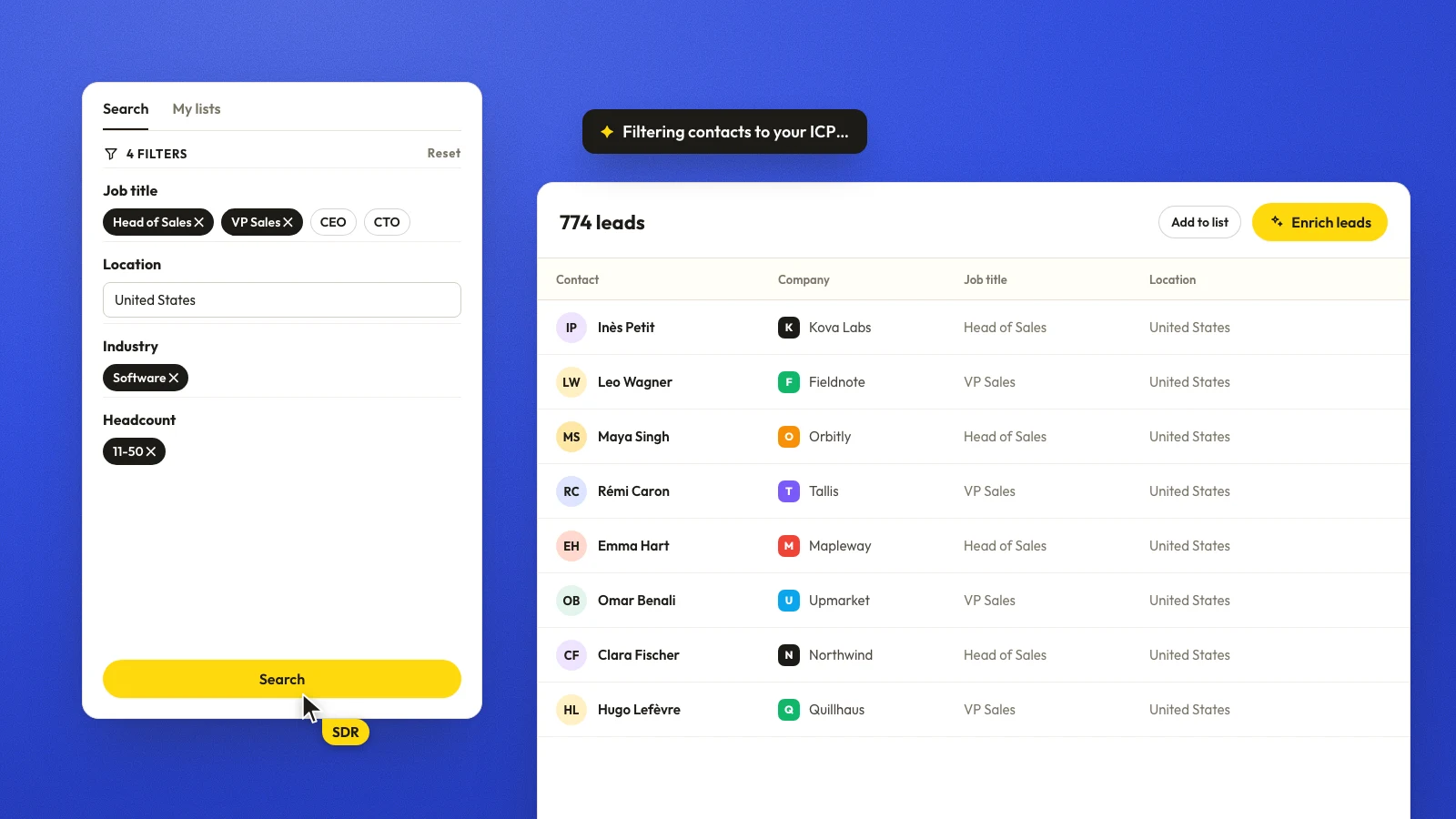
Article summary
- A B2B contact database has two layers. Company records carry industry, location, employee size and status; person records carry title, email and mobile, which change more often.
- Volume does not prove trust. Store the source, the verification outcome and the last-checked date for each field, and re-enrich when a title changes or an email hard-bounces.
- Judge a database on coverage, evaluation, compliance and integrations, and read coverage as a usable match rate in your ICP rather than a raw record count.
- Run it as a workflow (target frame, clean, enrich, verify, sync) and send only the qualified subset to the CRM and sequencer, with suppression flowing back.
- More data is not always better. Enrich when a field changes routing, compliance handling or reply quality, and suppress the fields that only add noise.
Want to go further? Ask
 ChatGPT
 Claude
 Perplexity
 Grok
GrokOn this page
- 01The SDR Whose List Looked Clean Anyway
- 02What a B2B Contact Database Actually Is
- 03How Contact Databases Are Built and Kept Current
- 04Evaluating a B2B Contact Database on What Matters
- 05Running an Outbound Workflow on Top of the Database
- 06Measuring Database Quality Beyond Accuracy
- 07When More Data Is a Liability
- 08Your First 30 Days With a New B2B Contact Database
Maya's list looked clean in the dashboard. By lunchtime, the campaign had already turned into a cleanup job, because the inbox did not care that the vendor had called the data “verified.” That gap is the whole problem with a B2B contact database conversation, the buyer is rarely choosing between good and bad data, they're choosing between a system that stays usable and one that falls apart the moment a real sequence hits it.
A useful database is not a spreadsheet of names. It is an operating system for outbound, built to combine company records, person records, verification, suppression, and sync logic so sales can act on it without guessing. Teams that treat it like a static asset usually end up paying twice, once for access and again for the cleanup.
The list, in the vendor dashboard: "verified."
The campaign by lunchtime:

The SDR Whose List Looked Clean Anyway
Maya had pulled a 2,000-record sequence from a single-provider tool, filtered it by title, and trusted the platform's label. The first sends exposed the flaw. Some emails bounced immediately, some contacts had moved, and some records belonged to companies that were still in the database but no longer fit the territory.
The mistake wasn't just bad luck. It was assuming that a vendor claim could replace operational checks. A database can look complete and still fail on deliverability, role relevance, compliance, or routing.
Practical rule: if a list only proves it exists, not that it still matches the buyer's workflow, it isn't ready for outbound.
The right mental model is simpler and harsher. A B2B contact database is a continuously changing system, not a static file. That means the useful question isn't “How many records are there?” It's “How quickly does the system surface the right contact, prove the field is current, and keep the record usable after the first send?”
That framing matters for SDRs, BDRs, RevOps, and GTM operators because each role pays for different failure modes. SDRs care about connect rates. RevOps cares about suppression, sync hygiene, and field freshness. Sales leadership cares about whether the database supports pipeline, not just list-building theater.
What a B2B Contact Database Actually Is
A B2B contact database has two layers that need to work together. One layer is the company record, which carries fields like industry, location, employee size, and status. The other is the person record, which carries job title, email, mobile, and other contact fields that change more often than the company itself.
| Layer | Fields it carries | How often it changes | What it supports |
|---|---|---|---|
| Company record | Industry, location, employee size, status | Less often than the people in it | Territory design and account coverage |
| Person record | Job title, email, mobile and other contact fields | More often than the company itself | Outreach |
This guide is about the person layer and the system around it, across every channel. If you only need the email side, read the B2B email database guide; for company-level lists, see databases of businesses.
Company records and person records are not the same object
U.S. business statistics make that distinction visible. The Census Bureau reported 8,361,342 business establishments in 2023, and 7,152,312 had 19 or fewer employees, which is about 85.5% of all establishments. A database that only optimizes for large enterprises misses the fact that most target accounts are small, fragmented, and often harder to map cleanly across roles and locations. Census business establishment data
That's also why establishment and firm data can't be collapsed into one field. One company can operate multiple locations, which means company identity, location, employee size, and status all need to stay distinct over time. A useful contact database keeps those fields structured so segmentation doesn't break the moment the buyer has more than one office or more than one decision-maker.
The database is the system, not just the records
The source layer matters, but the refresh layer matters just as much. Records are inputs, verification is a process, and CRM or engagement tools are consumers. If the system can't preserve provenance, timestamps, and correction logic, then the list is only temporarily useful.
A record that was correct last quarter but wrong today is not “still good enough.” It is a routing error waiting to happen.
That's the conceptual model the rest of the operator's decision rests on. Company data supports territory design and account coverage. Person data supports outreach. The system in between decides whether both can stay aligned long enough to produce a conversation.
How Contact Databases Are Built and Kept Current
Most databases are assembled from a mix of first-party capture, third-party providers, public records, and enrichment passes. The single-source story sounds neat, but it creates a ceiling on coverage and a ceiling on freshness. That's the main reason many teams end up layering providers or using waterfall enrichment instead of betting the quarter on one dataset.
Volume does not equal trust
The FTC's 2014 study of nine data brokers showed brokers collecting and storing billions of data elements covering nearly every U.S. consumer, which proved scale but not accuracy, transparency, or permitted use. That lesson still applies to B2B contact systems. Large collections can be impressive and still be poor for outbound if provenance is unclear or if validation is weak. FTC data broker findings
The vendor deck: "billions of data elements."
RevOps, asking where each field came from:

The better architecture is layered. One source fills a gap, another source confirms it, and the workflow stores the result with a timestamp and confidence score. That's also why job-change signals matter. Published decay estimates vary, but one analysis reports about 12.25% of U.S. sales VPs and C-suite leaders changing jobs within 12 months and 25.67% within 24 months, while warning that the common 22.5% to 30% annual decay claims are not backed by a single universally validated study. Contact data decay analysis
Field-level refresh beats one global refresh date
That decay pattern means a database should not be refreshed like a quarterly snapshot. Employer, title, email, and phone each age differently. A clean implementation stores source provenance, verification outcome, and last-checked date for each field, then triggers re-enrichment when a title changes, an email hard-bounces, or a high-value campaign is about to launch.
For teams already thinking in workflow terms, the practical version is simple. Use a Waterfall Enrichment layer to widen coverage, then validate the results before they ever hit sequence tooling. Pipecorn's waterfall enrichment approach is a useful reference point for that kind of workflow, because it turns record finding into a routed, checked process rather than a one-off lookup. Pipecorn waterfall enrichment
Operator insight: if a vendor can't show how a record changes state after a bounce, a role change, or an opt-out, the system is missing the part that keeps outbound usable.
For broader context on how teams manage adjacent identity data, SigFinch's guide to signature platform workflow design is a useful reminder that contact data doesn't live in one tool. It has to stay coherent across systems that send, sign, enrich, and suppress.
Evaluating a B2B Contact Database on What Matters
The shortlist should be judged by whether it supports revenue work in production, not by catalog size or sales-page polish. Four checks matter most, coverage, evaluation, compliance, and integrations, because those are the points where a record either turns into a conversation or creates rework.
| Axis | What to measure | Operational signal |
|---|---|---|
| Coverage | Verified match rates by region and persona | The database finds the people you sell to, not just the ones easiest to index |
| Evaluation | Field freshness, deliverability support, suppression handling | Records stay usable after job changes, bounces, and opt-outs |
| Compliance | Source capture, lawful basis workflow, regional suppression logic | The system can prove how each field is allowed to be used |
| Integrations | CRM sync, sequencing handoff, webhook or API support | Updates reach the tools that send mail and log activity |
Coverage should be read as usable match rate, not raw record count. A large directory that misses your ICP in one region is weaker than a smaller database that consistently fills the roles your reps target. Evaluation is where many vendors stay vague, because they sell “accuracy” while blending together field freshness, deliverability, and suppression handling.
Compliance is not a legal footnote. Under the UK GDPR and PECR, direct marketing through email or phone can trigger both data-protection and electronic-marketing rules, and consent may be required for the channel even when a lawful basis exists under data-protection law. The ICO's framework requires purpose, necessity, and balancing assessment, so the record needs source and intent metadata, not just a verified label. ICO direct marketing guidance
A database also has to survive operational suppression. Hard bounces, role changes, and opt-outs need to flow into the same workflow that keeps records usable, or the team ends up reactivating bad contacts and rechecking the same flags by hand. For a practical reference on how verification separates usable records from risky ones, see Pipecorn's data verification guide.
For a shortlist, the useful test is simple. Can the tool fit the CRM and engagement stack you already run, and can it move qualified records into those systems without creating duplicate suppression work? If the answer is no, the database may look complete and still fail the job.
Running an Outbound Workflow on Top of the Database
The database only becomes useful when the team wires it into a repeatable outbound flow. The sequence starts with an ICP-aligned company and persona list, then moves into cleaning, enrichment, verification, sync, and suppression management.
The workflow that holds up in production
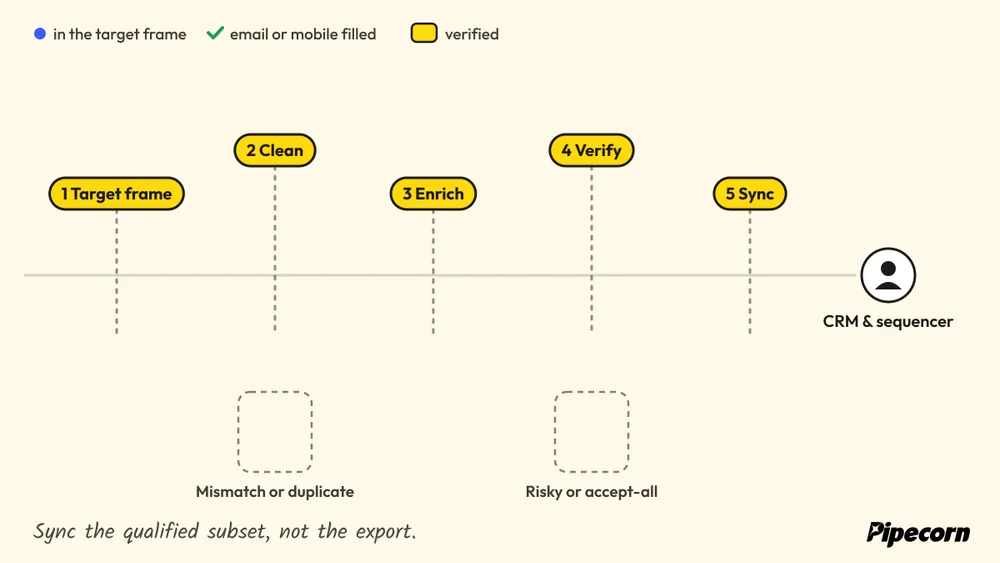
- Define the target frame. Sales ops narrows the company list by industry, employee size, geography, and the personas that actually influence a deal.
- Clean against targeting rules. AI cleaning or rules-based filtering removes mismatched companies, duplicate entries, and records that don't belong in the sequence.
- Run enrichment. Waterfall logic fills email and mobile gaps across multiple sources rather than relying on one provider.
- Verify before activation. Confirmed emails and valid mobiles are separated from risky, accept-all, or untested records.
- Sync to execution tools. CRM and sequencing platforms get the qualified subset, not the entire raw export.
That order matters because failures compound when the handoff is sloppy. Accept-all addresses mixed with confirmed addresses can distort deliverability. Mobile numbers need to be separated from landlines so connect expectations stay honest. Job-change events arriving mid-sequence can make a perfectly timed campaign hit the wrong person.
A team that works this way also needs a suppression loop. Hard bounces, opt-outs, complaint history, and role changes should move back into the database automatically, not wait for a quarterly cleanup sprint. That's what keeps the sequence from repeatedly contacting records that should already be blocked.
For teams looking at adjacent automation patterns, how recruiters automate lead discovery is a useful parallel. Recruiting systems face the same pressure to find, validate, route, and refresh contacts before outreach becomes noisy or stale.
Weekly metrics that keep the workflow honest
- Verified-email rate, because confirmed deliverability matters more than raw record volume.
- Live-mobile rate, because mobile lists without connectability create false optimism.
- Hard-bounce rate, because bounce clusters reveal where the database or sync logic is failing.
- Connect rate, because a clean-looking list that never gets answered is still a weak list.
Pipecorn's outbound sales automation workflow is relevant here because it combines list building, enrichment, verification, and CRM sync in one operating path. Pipecorn outbound sales automation
Measuring Database Quality Beyond Accuracy
A clean-looking database can still fail in production. Contacts age, roles change, suppression lists drift, and a database that looks accurate at the account level can still send reps into dead ends. The review question is whether the system keeps producing usable conversations.
The metrics that matter in review
Recent Demandbase research found that only 45% of B2B marketers were very confident in their ability to connect data across teams, which says as much about operational trust as it does about raw quality. Demandbase research
A review-level dashboard should track different signals from the weekly workflow view. Use field-specific reporting to separate title freshness, email validity, mobile validity, and suppression handling, and define the thresholds in your data quality standards.
- Suppression accuracy, so opt-outs, do-not-contact records, and channel restrictions stay blocked across systems.
- Field-level freshness, especially for titles, employers, and other fields that drive segmentation.
- Cost per qualified meeting, which shows whether the database is producing meetings worth the spend.
- Cohort-level drift, which reveals how the same list degrades across personas, territories, or segments over time.
That last metric changes the conversation fast. A database can look stable in aggregate while enterprise contacts age faster than SMB records, or one territory starts producing more stale titles than the rest.
Decision rule: measure cohorts, not averages. The same 1,000-record list can age very differently for enterprise VPs than for SMB owners, and the average hides that drift.
PreSales Unleashed reporting tips for operational KPI reviews are a useful model for showing metrics in a way sales leaders can use.
A database review that only prints record totals is accounting. A review that ties field freshness, suppression quality, and meeting output back to pipeline gives RevOps something defensible in a steering meeting.
When More Data Is a Liability
A bigger database can look safer on paper and still create more work in the queue. Over-enrichment adds fields that change nothing about routing or reply quality, and it can create duplicate records when enrichment sources keep filling the same profile in different ways. It also adds personal mobile numbers that the team may not be able to use, which means more cleanup and a wider surface to govern.
Every enrichment source, writing the same person
with slightly different fields:

The compliance risk grows as the profile gets richer. A new phone field or email field is not just another data point, it can create another channel with its own suppression and permission handling requirements. That is why adding data without a clear use case often increases operational exposure faster than it improves coverage.
The right size is the governable size
Three patterns usually show that enrichment has gone too far:
- Duplicates multiply, because multiple sources keep writing the same person with slightly different fields.
- Suppression work expands, because opt-outs, deletions, and channel restrictions now have to move across more systems.
- Signal quality drops, because inferred interests look useful but do not improve reply rates enough to justify the added risk.
The FTC's telemarketing rules and California's opt-out structure point in the same direction, more data does not automatically mean more permission, more relevance, or more conversations.
Pipecorn's data deduplication workflow is relevant here because it reflects the tradeoff, fewer duplicates and cleaner routing are often worth more than larger raw lists.
The cleanest rule is simple. Enrich when the added field changes routing, compliance handling, or reply quality. Remove or suppress when the field only adds noise and does not change the action.
Your First 30 Days With a New B2B Contact Database
The first month should be about control, not ambition. Start by choosing two or three buyer personas, then define field-level acceptance thresholds for email, mobile, title, and company data. Wire the CRM and sequencing tools before anyone loads a list, because sync mistakes are harder to unwind after the first send.
After that, set suppression ingestion as a mandatory step. Opt-outs, hard bounces, and do-not-contact records should flow into every downstream system, not sit in one place waiting for manual cleanup. The weekly review should include verified-email rate, live-mobile rate, bounce rate, connect rate, and the number of records corrected by source or field.
A practical checklist for week one to four looks like this:
- Finalize the target personas.
- Define acceptance thresholds by field.
- Connect CRM and engagement tools.
- Turn on suppression sync.
- Review one quality dashboard every week.
If the new stack is starting to look like a patchwork of list builder, enrichment vendor, verifier, and sync connector, consolidation starts to matter. A platform such as Pipecorn can sit on top of that workflow by combining list building, waterfall enrichment, verification, and CRM delivery in one operating path, which is exactly the kind of simplification most RevOps teams end up wanting after the first messy rollout.
If the current database still feels like a stack of disconnected tools, Pipecorn is worth a look as the next operating decision. Visit Pipecorn to compare how list building, enrichment, verification, and CRM sync can fit into one outbound workflow.