
10 Essential B2B Sales Tools for High-Performing Teams
Explore 10 essential B2B sales tools, from CRM to intent analytics, with use cases, integrations, and pricing insights to optimize your 2026 sales stack.
Article summary
- A strong B2B sales stack shortens the time from list building to live outreach and keeps each handoff clean for the CRM, sequencing and reporting.
- The ten tools solve different parts of the workflow. Some supply and verify contact data, LinkedIn Sales Navigator adds network signals, and Outreach and Salesloft run the sequences.
- A workable stack has one source for prospect discovery, one system for enrichment and validation, one engagement platform and one CRM as the record of truth.
- Start where the friction is. Missing or wrong contacts call for a data layer first, inconsistent execution calls for an engagement platform.
- Quote-based platforms add depth along with procurement overhead. Credit-based tools are easier to start with, but costs rise when usage is not governed.
Want to go further? Ask
 ChatGPT
 Claude
 Perplexity
 Grok
GrokOn this page
What happens when the main sales problem is not lead volume, but reps are still working from stale data, fragmented signals, and tools that do not talk to each other? That gap is where many B2B sales tools articles stop short. The stronger stack is not about adding more software. It reduces the time from list building to live outreach, while keeping each handoff clean enough for CRM, sequencing, and reporting to work together.
The buying process has changed, so the tool mix has changed with it. Buyers now move across multiple channels before they commit, and many research companies and products before speaking with sales. Sales teams have also been shifting toward data-driven execution. For broader context on how B2B teams are adapting their workflows, see top AI task automation tools. The practical takeaway is straightforward. A sales stack now has to support enrichment, routing, sequencing, and analytics, not only contact storage, and teams comparing B2B lead generation tools like Zoominfo need to look at how each tool fits into that full motion.
The comparison below focuses on tools that solve different parts of that workflow. Some tools serve as the core of an outreach engine. Others improve data accuracy, raise connect rates, or connect separate systems so the rest of the stack stays usable. The best choice depends on whether a team needs cleaner prospect data, stronger outbound execution, or a better bridge between sales activity and reporting.
RevOps, explaining how a lead gets from the spreadsheet
to the sequencer and back into the CRM:

Table of Contents
- 1. Pipecorn
- 2. ZoomInfo
- 3. Apollo
- 4. Cognism
- 5. Lusha
- 6. Clay
- 7. LinkedIn Sales Navigator
- 8. Outreach
- 9. Salesloft
- 10. Seamless.AI
- Top 10 B2B Sales Tools Comparison
- Building Your Ideal Sales Tech Stack
1. Pipecorn
Pipecorn stands out because it handles the part of outbound that many teams still patch together by hand, finding the right contact data and pushing it into the tools reps already use. The company positions itself as a B2B data platform that aggregates 100+ providers, verifies emails and mobile numbers in real time, and routes qualified contacts into CRMs and sales engagement tools automatically. That matters because generic cold outreach still underperforms, and the verified benchmark set shows average cold email reply rates at only 1% to 5% for generic outreach, with around 8.5% in better segmented campaigns, while another benchmark cited in the verified data says only 8 out of 100 emails get a reply Gradient Works sales performance benchmarks.
Practical rule: if your team still exports lists, cleans them in spreadsheets, and re-imports them into sequences, you are spending selling time on workflow glue instead of pipeline.
Pipecorn's main differentiator is waterfall enrichment. It searches across multiple sources instead of depending on one database, which helps when teams sell into different regions and need broader coverage than a single provider can usually offer. The verified data also points to the value of region-aware outbound, since clean data plus country-based routing can outperform generic one-size-fits-all claims. Pipecorn also highlights job-change tracking, new-hire alerts, hiring signals, tech-stack signals, and social engagement cues, giving reps earlier signals about buyer movement.
Where Pipecorn fits in the stack
Pipecorn works best for VPs of Sales, SDR and BDR teams, RevOps, GTM engineers, and outbound agencies that want a cleaner path from list to sequence. It offers HubSpot, Salesforce, and Pipedrive syncs, integrations with Outreach, Salesloft, lemlist, API and MCP endpoints, webhooks, and a Chrome extension for contact discovery. That makes it a practical layer for teams that want one enrichment system feeding both CRM and activation, instead of managing separate tools for verification, routing, and sequencing.
The pricing message appears to mix Free, Build, Grow, and Scale plans with credit-based verification language, so the exact billing model should be confirmed directly on Pipecorn's website. The buying signal is straightforward. If broader coverage, verified mobiles, and automated delivery into an existing stack matter to your team, Pipecorn is built for that motion.
2. ZoomInfo
ZoomInfo is the standard reference point for teams that want a go-to-market system, not just a contact database. Its appeal is breadth. The platform combines contact and company data with intent signals, technographics, org charts, enrichment, routing, website visitor identification, and engagement add-ons. For larger revenue teams, that mix can reduce the number of vendors that need to be coordinated, which is why it still comes up often in enterprise outbound planning.
Its value is not only in the database itself. ZoomInfo also sits around the database as an orchestration layer. If sales operations needs data to move into CRM, routing, and engagement workflows with fewer manual steps, a platform like ZoomInfo can serve as a central source of truth. That matters in a market where sales automation adoption already supports workflow integration instead of isolated point solutions, as noted in WorldMetrics on B2B sales automation.
Best fit and trade-offs
ZoomInfo usually fits mid-market and enterprise teams with established RevOps support and a strong need for standardization. It is a practical match for account-level visibility, enrichment, and trigger-based outreach at scale. The trade-off is that it is not a light-touch tool, and its pricing is sales-led and quote-based, so smaller teams often feel the implementation and commercial overhead before they feel the payoff.
The best use case is a team that wants one data layer to support prospecting, routing, and outreach. If your motion depends on account prioritization, clean handoffs, and coordinated execution across sales and marketing, ZoomInfo can fit that operating model well. If your team mainly needs stronger mobile coverage or a faster list-to-sequence workflow, a more specialized provider may be easier to put into production.
| Your priority | What tends to fit | The cost to weigh |
|---|---|---|
| Consolidation: one data layer for prospecting, routing and outreach | A broad platform such as ZoomInfo | Implementation and commercial overhead, quote-based pricing |
| Stronger mobile coverage or a faster list-to-sequence workflow | A more specialized provider | Another tool to connect to the CRM and the engagement platform |
For stack design, ZoomInfo pairs well with an engagement platform like Outreach or Salesloft, but it can also become the larger system that reduces the need for separate point tools. Teams comparing data-first platforms often review B2B lead generation tools like ZoomInfo to see whether a narrower tool would fit their workflow better. If consolidation matters, ZoomInfo remains a serious option. If the priority is speed and simplicity, the operational cost deserves close attention.
Website: ZoomInfo
3. Apollo
Apollo is popular because it lowers the barrier to getting a functioning outbound workflow in place. It combines a prospecting database with email and phone sequencing, plus CRM integrations and a Chrome extension, so a small team can move from targeting to outreach without stitching together multiple systems. For teams that want data plus sequencing in one interface, that simplicity is the main value.
Apollo is especially attractive when email-led prospecting is the core motion. The workflow is easy to understand, which matters more than people admit. A tool that your reps use beats a technically richer platform that sits half-configured in the background. That said, the moment you lean hard on mobile dialing or deeper credits, the economics become less simple, and the value starts depending on how disciplined your team is about usage.
Good use cases
Apollo tends to work best for founders, lean SDR teams, and growth operators who need fast setup and decent coverage without a full RevOps rollout. It's a sensible first-layer prospecting tool if your team is still defining segments and messaging. It also fits organizations that want a low-friction way to test outbound before moving into a more specialized data stack.
Integration notes
Apollo's strength is that it lives close to the rep workflow, so it often sits at the front of a stack that later includes enrichment, scoring, and engagement automation. If your team already uses a separate CRM and sales engagement tool, Apollo can still serve as the data discovery layer, but you'll want to watch for duplicate records and credit leakage. That's where ops discipline matters as much as tool choice.
Website: Apollo
4. Cognism
Cognism stands out for its focus on verified mobile numbers and compliance, especially for teams selling into Europe and other regulated markets. In outbound work, the gap between a raw number and a verified one is operational, not cosmetic. If reps waste time dialing bad numbers, connect rates drop and calling volume becomes harder to trust. That is why mobile quality and caller trust matter so much in phone-led outbound.
That emphasis makes Cognism's Diamond Data positioning relevant. It is built around a practical question many contact platforms avoid, whether a number is worth dialing. For teams that still depend on phone outreach, that can improve connect efficiency, especially when campaigns are tightly segmented and the list criteria are disciplined.
Where Cognism is strongest
Cognism fits EMEA-heavy teams, enterprise SDR organizations, and companies that need more confidence around compliance controls. Its governance posture and mobile-first pitch make sense when call quality is central to the pipeline plan. If your buyer geography is privacy-sensitive, the platform's emphasis on data controls becomes part of the value proposition, not just a legal review item.
The trade-off is cost and fit. It is rarely the first choice for very small teams, and U.S. performance can vary by segment, so a proof of concept is a smart move before committing. For teams that live and die by connect rates, though, Cognism belongs on the shortlist. Teams that compare it with other outbound data platforms often pair that review with a look at sales navigator vs Apollo workflows to see where contact quality, sequencing, and rep efficiency separate in practice.
Cognism also fits teams that already treat outbound data as part of a larger stack, not a standalone purchase. If your workflow depends on CRM hygiene, enrichment standards, and clear routing rules, a cleaner data layer can reduce rep friction and keep lists more usable over time. For managers evaluating adjacent discovery and engagement tools, the partner guide on LinkedIn analytics tools can help frame how prospecting, profile research, and downstream reporting connect in the same motion.
Website: Cognism
5. Lusha
Lusha is one of the easiest tools to deploy when a team wants a simple contact lookup workflow. Its credit-based model, Chrome extension, and CRM integrations make it straightforward for reps to understand and for admins to manage. That simplicity is the point. If your team wants a quick way to capture emails and phone numbers from LinkedIn and the web, Lusha removes a lot of friction.
The platform is also positioned with compliance credentials, including SOC 2 Type II and ISO 27701/27001, which helps when procurement or security teams want a cleaner review path. For smaller and mid-sized teams, that can make adoption easier than with heavier enterprise systems.
What to watch
Lusha is best when you want a predictable lookup and export motion, but the true cost depends on credit usage, so usage discipline matters. It's not the tool you choose if your primary challenge is deep waterfall enrichment or complex routing logic. It is the tool you choose if your team wants a fast onboarding path and a familiar rep experience.
The cheapest tool on paper can become expensive if reps burn credits on poorly targeted lookups.
The rep, after a week of lookups on a list
nobody filtered first:

Lusha also makes sense when you want a contact data layer that can sit beneath another outbound workflow. The internal alternative guide at Pipecorn's Lusha alternatives overview is useful if you're comparing coverage styles and workflow depth before making a decision. For many teams, Lusha is the “good enough, easy to adopt” option.
Website: Lusha
6. Clay
Clay is less of a single-purpose data provider and more of a flexible enrichment workspace. That distinction matters. If your team wants to combine multiple providers, clean the results, dedupe records, and push the final output into CRM or sequencers, Clay gives you the building blocks to do it. It's especially attractive for ops-minded teams that want to design their own waterfall logic instead of accepting a vendor's defaults.
The value of Clay is in control. You can decide what gets queried, when the enrichment happens, and how the output is routed. That makes it strong for teams that care about precision, but it also means the platform rewards people who understand data logic and process design. If you don't have that skill set internally, the flexibility can become overhead.
Best use cases
Clay works well for RevOps, growth engineering, and outbound teams that need custom research flows. It can also support more advanced list-building when a static database isn't enough. Because it can consolidate enrichment steps, it often ends up sitting in the middle of a stack, between source data and activation.
The internal comparison at Pipecorn's waterfall enrichment breakdown is helpful if you're deciding whether to build enrichment logic around a flexible workspace or a more opinionated outbound data platform. Clay is powerful, but it asks more from the operator.
Integration notes
Clay connects naturally to tools like Outreach, Salesloft, HubSpot, and Salesforce, which makes it a strong candidate if your current stack is already mature. It's not the fastest path to value for a non-technical team, but for groups that want to customize routing and enrichment logic, it can become a central operating layer.
Website: Clay
7. LinkedIn Sales Navigator
LinkedIn Sales Navigator remains one of the more useful tools in the outbound stack because it sits close to the professional network buyers already use. Its value comes from context, not database size. Reps get advanced search, account and lead lists, alerts, InMail, and job-change signals inside a platform where many decision makers already keep their professional identity current.
That proximity matters. Buyers now move across multiple channels during a purchase, so a network-native tool still has a clear role in early-stage prospecting and timing. Sales Navigator helps reps identify decision makers, monitor role changes, and time outreach around observable activity instead of relying on guesswork.
How it should be used
Sales Navigator works best as a signal layer, not a full outbound system. It provides strong native org mapping and relationship context, but its messaging automation is limited compared with a dedicated engagement platform. That makes it a useful companion to enrichment tools and outreach sequencing software, where LinkedIn signals become inputs to action rather than the final step.
For many teams, it is table stakes. The more useful question is how tightly it is connected to the rest of the stack. If you want to compare it with other prospecting motions, the internal guide at Pipecorn's Sales Navigator versus Apollo comparison is a useful starting point.
Website: LinkedIn Sales Navigator plans
Backlink context for social selling analysis, LinkedIn analytics tools
8. Outreach
Outreach is built for teams that need process discipline at scale. It centralizes multichannel sequences, dialer activity, deal management, conversation intelligence, and forecasting, which makes it a common choice for enterprise sales organizations that want standardization across many reps and managers. If your team cares as much about reporting and governance as it does about sending messages, Outreach belongs near the top of the shortlist.
The strongest case for Outreach is operational consistency. Large teams need a system that helps managers coach, leaders forecast, and reps execute without improvising every day. Sales enablement has become mainstream operating infrastructure, and analysts at B2B sales enablement industry statistics note that 54% of sales leaders use AI-powered enablement tools daily, which helps explain why platforms like Outreach are now judged on control as much as activity volume.
Operational insight: Outreach makes sense when your biggest problem is execution variance across a large team, not basic prospecting access.
The sales manager, reviewing fifty reps
each running their own version of the sequence:

Pricing and implementation signals
Outreach is quote-based and typically annual, so it is not a lightweight procurement decision. The platform also takes more implementation effort than SMB tools, which is expected for software designed to coordinate many reps, sequences, and reporting layers. If you already have a reliable data source, Outreach often serves as the activation engine that turns that data into repeatable pipeline motion.
Website: Outreach
9. Salesloft
Salesloft is one of the closest comparisons to Outreach, but it often stands out for usability and reporting that managers can act on quickly. It brings together multichannel cadences, dialer activity, analytics, and pipeline management, so reps and managers can work from the same system without the interface feeling crowded. That matters when adoption becomes the main constraint in a sales stack.
The platform fits teams that want strong execution without adding too much complexity for end users. Salesloft is designed to act as the engagement layer, while external data sources handle enrichment and validation. That division of labor fits the way many B2B teams build their stack, with one tool for contact quality and another for outreach execution.
Where it fits best
Salesloft works well for global SDR organizations and leadership teams that need visibility across reps, sequences, and pipeline. It is often evaluated alongside Outreach because the decision usually comes down to workflow preference and reporting style. If managers need clean dashboards and reps need a cadence engine they can use consistently, Salesloft is a practical option.
The main limitation is that it still depends on an external data source. Salesloft is strong for engagement, but it does not solve contact data on its own. For teams that already have reliable enrichment in place, it can become a useful activation layer that turns that data into repeatable outbound activity.
Website: Salesloft
10. Seamless.AI
Teams that want an extension-first way to find contacts and capture basic signals often look at Seamless.AI. Its mix of prospecting, enrichment, buyer intent, job-change alerts, and Chrome-based lookups gives small teams a fast path to list building without much setup. That matters most for teams that need immediate output, not a more elaborate operating model.
The main appeal is ease of adoption. A browser-based workflow is usually easier for reps to pick up than a system that demands lengthy onboarding, and that can reduce the gap between purchase and actual use. For smaller teams or groups still testing their outbound motion, that difference often determines whether the tool becomes part of the daily workflow or sits unused.
Buying signals to pay attention to
This particular AI platform fits best when a team wants a broad feature set and self-serve onboarding, but the output should be tested by segment before it becomes a core source. Contact quality can vary depending on the audience, so the practical question is not whether the tool covers the basics, but whether it supports the specific list quality your motion requires. That is especially true in outbound, where generic targeting tends to underperform and better-targeted data usually produces stronger response rates.
Website: Seamless.AI
Top 10 B2B Sales Tools Comparison
| Product | Core features & USP ✨ | Quality / Rating ★ | Target 👥 | Price / Value 💰 |
|---|---|---|---|---|
| Pipecorn 🏆 | Waterfall enrichment (100+ sources), real-time email & mobile verification, AI cleaning, CRM & engagement syncs, job-change/hiring signals ✨ | ★★★★★, ~80–95% find; 80–92% phone connect | 👥 GTM leaders, SDR/BDR teams, RevOps, outbound agencies | 💰 Tiers: Free → Build → Grow → Scale; credit‑metered verification, rollover; higher tiers: custom routing & priority support |
| ZoomInfo | Large global contact & company DB, intent/technographics, org charts, enrichment + engagement add-ons ✨ | ★★★★☆, deep enterprise coverage & integrations | 👥 Mid‑market & enterprise GTM teams | 💰 Quote-based annual contracts; higher TCO |
| Apollo | Prospecting DB + native email/phone sequences, dialer add-ons, API & Chrome extension ✨ | ★★★★☆, strong entry-level value for email-led outreach | 👥 SMBs & small outbound teams | 💰 Accessible entry price; costs scale with credit/dialer use |
| Cognism | Verified mobile focus (Diamond Data), GDPR/CCPA practices, CRM enrichments; strong EMEA coverage ✨ | ★★★★☆, excellent mobile validation & compliance | 👥 Teams prioritizing mobile connects & regulated markets | 💰 Sales‑led pricing; typically above SMB tools |
| Lusha | Simple credit-based lookups, Chrome extension, CRM integrations; fast UX ✨ | ★★★☆☆, easy to use; coverage varies by segment | 👥 Small→mid teams wanting simple lookup/export workflows | 💰 Credit system; cost depends on usage |
| Clay | Multi-provider waterfalls, enrichment recipes, Claygent web research, sequencer → CRM ✨ | ★★★★☆, highly flexible for ops-driven enrichment strategies | 👥 RevOps, data/ops teams, advanced automation users | 💰 Costs depend on called providers; budgeting required |
| LinkedIn Sales Navigator | LinkedIn graph search, lead/account lists, InMail, job-change & company alerts ✨ | ★★★★★, highest-fidelity org mapping & job-change signals | 👥 SDRs, account-based teams, recruiters | 💰 Per-seat subscription; scales with team size |
| Outreach | Multichannel sequencing, integrated dialer, conversation intelligence, enterprise governance ✨ | ★★★★★, enterprise-grade engagement & coaching tools | 👥 Large sales orgs (50+ reps), enablement teams | 💰 Quote-based enterprise pricing; heavier implementation |
| Salesloft | Cadences (email/phone), dialer, analytics & leader dashboards, strong CRM ties ✨ | ★★★★☆, balanced UX for reps & leaders | 👥 Mid→enterprise SDR teams & sales leaders | 💰 Sales‑led pricing; often requires separate data provider |
| Seamless.AI | Contact discovery + Chrome extension, buyer intent & job-change alerts, API access ✨ | ★★★☆☆, fast, extension-first workflow; accuracy varies | 👥 Small teams, self-serve prospectors | 💰 Self-serve plans + enterprise tiers; credit policies vary |
Building Your Ideal Sales Tech Stack
The strongest B2B sales tools stack is usually the one that reduces the distance between account identification and a relevant first touch, while keeping CRM records, sequencing, and reporting accurate enough to trust. Sales teams already rely on automation, external data, and intent signals in daily workflows, so the practical question is how to connect those layers without adding avoidable complexity.
Start with the part of the motion that creates the most friction. If your team cannot find accurate contacts, begin with a data layer such as Pipecorn, Cognism, Lusha, Apollo, or Clay, depending on whether you need waterfall enrichment, mobile verification, simplicity, or flexibility. If your reps already have enough data but execution is inconsistent, shift attention to Outreach or Salesloft. If relationship mapping and buyer context drive your outreach, keep LinkedIn Sales Navigator in the stack, since it provides native signals external databases cannot fully replicate.
| Where the friction is | Start with | Tools named above |
|---|---|---|
| Reps cannot find accurate contacts | A data layer | Pipecorn, Cognism, Lusha, Apollo or Clay, by need: waterfall enrichment, mobile verification, simplicity or flexibility |
| Reps have enough data, but execution is inconsistent | An engagement platform | Outreach or Salesloft |
| Relationship mapping and buyer context drive outreach | Network signals, kept in the stack | LinkedIn Sales Navigator |
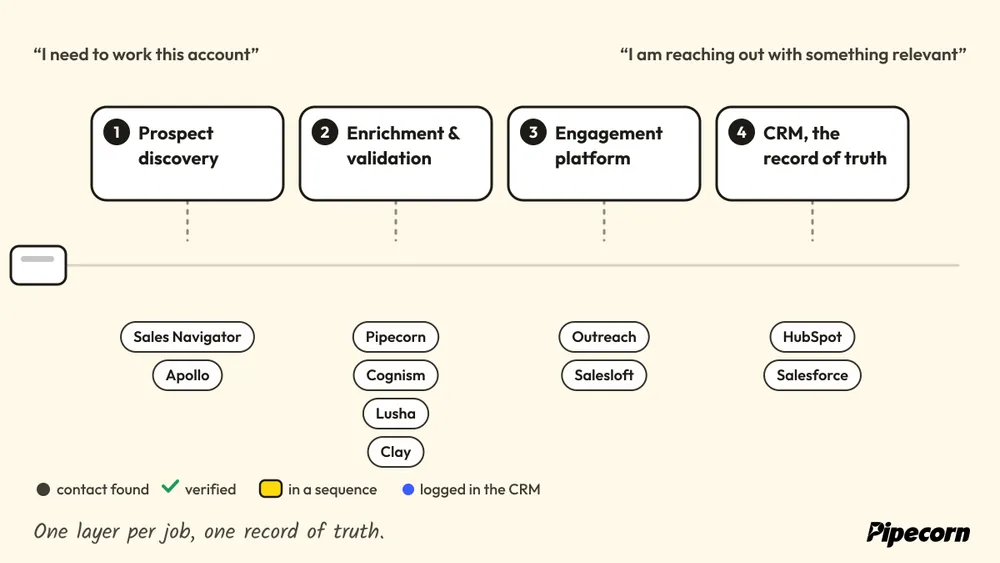
Integration deserves the same level of scrutiny as category fit. A workable stack usually has one source for prospect discovery, one system for enrichment and validation, one engagement platform, and one CRM that serves as the record of truth. Pipecorn stands out because it attempts to combine the first two layers in one workflow and then route the output into CRM and sequencing tools. That matters for RevOps teams that want less manual stitching and more consistent pipeline production.
Pricing signals should shape the decision as well. Quote-based enterprise platforms can provide depth, but they also add procurement overhead and implementation effort. Credit-based tools are easier to start with, but costs can rise quickly if usage is not governed. The better choice depends on whether the team is optimizing for speed, coverage, compliance, or standardization.
| Pricing model | Tools in this guide | What you get | What to watch |
|---|---|---|---|
| Quote-based or sales-led | ZoomInfo, Cognism, Outreach, Salesloft | Depth and standardization for larger teams | Procurement overhead and implementation effort |
| Credit-based or usage-based | Apollo, Lusha, Clay, Seamless.AI | An easier start and self-serve setup | Costs that rise quickly when usage is not governed |
A useful test is simple. How fast can a rep go from “I need to work this account” to “I am reaching out with something relevant”? Tools that do not shorten that path add noise. Tools that do shorten it deserve a place in the stack.
If you want a cleaner way to turn cold lists into qualified pipeline, Pipecorn is built for that workflow. It combines verified enrichment, waterfall coverage, and automated delivery into the systems your team already uses, which makes it a practical fit for outbound teams trying to reduce manual work and improve connect quality.