Background Check Emails Explained and How to Verify Them
Learn what background check emails mean, how to verify email addresses step by step, stay GDPR compliant, and improve deliverability for outbound teams.

Article summary
- "Background check emails" can mean two jobs. One is an HR message about employment screening. The other is checking whether an email address is valid and can receive mail.
- A screening notification should name the sender, explain the check, give one secure action, state a deadline and offer a support contact.
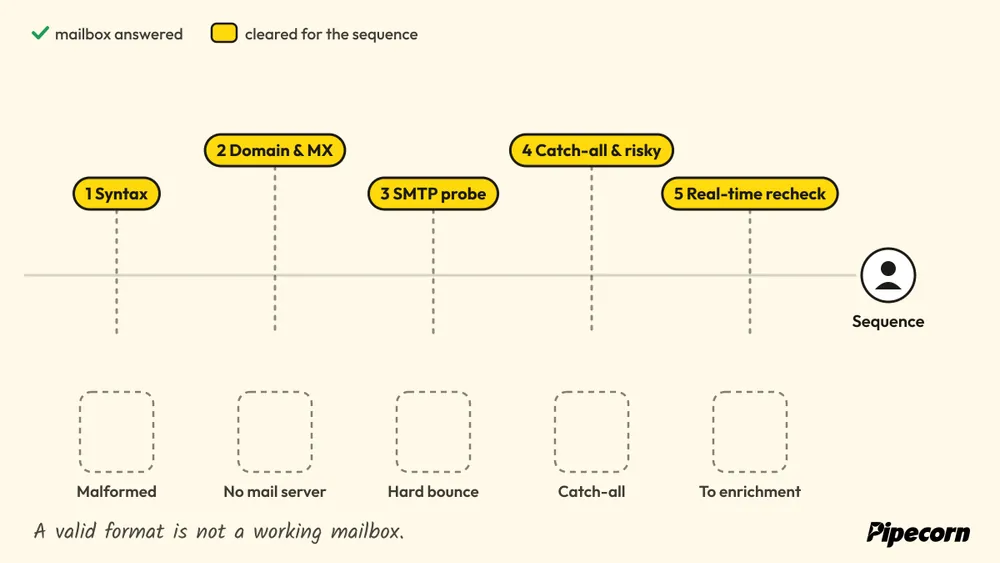
- Verification goes from cheap checks to direct ones. Syntax first, then the domain and its MX record, then an SMTP probe that sends nothing, then flags for catch-all and risky addresses.
- A verified mailbox is not a guaranteed inbox. Delivery also depends on the sender's SPF, DKIM and DMARC setup, its reputation and the receiving provider's filters.
- Verify at capture, recheck aging records before important sends, and keep the status, time, source and failure reason on the contact record.
Want to go further? Ask
 ChatGPT
 Claude
 Perplexity
 Grok
GrokOn this page
- 01Table of Contents
- 02Introduction to Background Check Emails
- 03What Background Check Emails Actually Mean
- 04Why Verified Emails Make or Break Outreach
- 05How to Verify Email Addresses Step by Step
- 06Background Check Email Templates That Get Responses
- 07Compliance Automation and Integration for Outbound Teams
- 08Measuring Success and Next Steps for Verified Contacts
A recruiter sends a candidate a background check email, but the candidate never sees it. The message may have bounced, landed in spam, or gone to an old address. In another workflow, an SDR imports a prospect list that looks complete, only to discover that many contacts can't receive outreach.
The phrase background check emails creates this confusion because it can describe two different activities. One is a hiring communication about screening. The other is the technical process of checking whether an email address is valid and deliverable.
Both problems have the same operational consequence: a person misses an important message, a process stalls, or a team wastes effort on unusable contact data. This guide separates the meanings, explains the verification pipeline, and shows how recruiters, candidates, SDRs, and RevOps teams can build clearer, more reliable workflows.
Recruiting: "Send the background check emails."
RevOps, running a mailbox verification on the candidate list:

Table of Contents
- Introduction to Background Check Emails
- What Background Check Emails Actually Mean
- Why Verified Emails Make or Break Outreach
- How to Verify Email Addresses Step by Step
- Background Check Email Templates That Get Responses
- Compliance Automation and Integration for Outbound Teams
- Measuring Success and Next Steps for Verified Contacts
Introduction to Background Check Emails
A candidate might receive a short message saying that a screening process has started and that consent or additional information is required. The email includes a secure link, but the candidate doesn't click it because the subject line looks suspicious. A deadline passes, the recruiter assumes the candidate is unresponsive, and the hiring process slows down.
The problem may not be the candidate's intent. It may be communication failure. The address could be invalid, the message could have been filtered, or the instructions could be unclear. A well-written notification can't complete its job if it never reaches the recipient or if the recipient can't tell what action is required.
The same phrase appears in outbound sales. A RevOps manager may ask for “background check emails” when they mean verifying prospect addresses before a campaign. In that context, the team isn't notifying a candidate about screening. It's checking whether a recipient mailbox exists and can accept mail.
The two audiences behind the phrase
Recruiters and HR teams care about consent, clarity, deadlines, privacy, and candidate support. Candidates need to know who sent the message, why the check is required, what they must do, and where to ask questions.
Outbound teams care about recipient validity, bounce prevention, sender authentication, and CRM hygiene. SDRs need confidence that a contact record is usable before it enters a sequence.
These workflows overlap at the communication layer, but they shouldn't be treated as the same process. A hiring notification is a human-facing message. Email verification is a technical control applied to the address itself.
Practical rule: First identify whether you're trying to explain a screening process or validate a mailbox. The right workflow depends on that answer.
By the end of this guide, you'll be able to distinguish the two meanings, understand what verification checks, create clearer candidate messages, and connect validation to CRM and sales engagement systems without treating list hygiene as a one-time task.
What Background Check Emails Actually Mean
A background check email usually means one of two things.
| Meaning | What it does | Typical recipient | Primary risk |
|---|---|---|---|
| HR notification email | Explains that screening has started and requests consent, documents, or another action | Candidate or employee | Confusion, missed deadlines, privacy concerns |
| Email verification workflow | Checks whether an email address is formatted correctly and appears able to receive mail | Prospect, candidate, or contact record | Bounces, blocked sends, stale data |
An HR notification is similar to a clear sign at a service desk. It tells someone what's happening and what they need to do next. The message should identify the employer or screening provider, explain the purpose of the check, provide one secure action, state a deadline, and offer a support contact.
Email verification is more like testing a delivery address before sending a package. The system evaluates the address and the receiving domain, then uses technical checks to estimate whether the mailbox can accept mail. It doesn't prove that the person owns the address, wants the message, or has consented to receive outreach.
An important boundary for hiring teams
An email background check may refer to a lightweight review of publicly visible signals connected with an email address. That kind of research can support basic due diligence, but it can't establish identity, employment history, criminal history, or legal eligibility. A formal employment screening report is a separate process with its own consent, accuracy, privacy, and compliance requirements.
That distinction matters because inaccurate screening information can affect employment and other major life decisions. For broader context on the consequences of incorrect reports, review how background report errors impact your life.
Choose the path that matches the job
If you're a recruiter, start with the notification workflow. Make the candidate's next action obvious and give them a reliable way to reach support.
If you're an SDR, sales operations manager, or data engineer, start with recipient verification. Validate the address before sending, then maintain the record as it ages.
If you're responsible for both, keep the workflows connected but separate. Candidate communication needs human clarity. Address verification needs technical testing.
Why Verified Emails Make or Break Outreach
A recruiter sends an interview request to a former employee's address. An SDR follows up with a prospect who changed companies. In both cases, the message may be well written, yet the recipient never sees it because the destination record is stale or mistyped.
The SDR, on the third follow-up to a prospect
who changed companies months ago:

Email data loses value over time. A widely cited benchmark reports that email lists lose about 22.5% of their value each year, while the same data reports an average email bounce rate of 10.4%. Authenticated lists can keep bounce rates below 1%, while unconfirmed lists are typically in the 3% to 5% range (ContactInfo's email verification benchmark). These figures show why a large spreadsheet can still produce weak delivery results.
A verification-first workflow treats each address like a destination that needs checking before a route begins. Teams validate new records, recheck older ones, and pause addresses that become risky. That approach reduces wasted outreach and helps hiring teams avoid delayed or missed requests.
Verification and deliverability solve different problems
Email verification checks the recipient. It evaluates whether the address is syntactically valid, whether the domain can receive mail, and whether the mailbox appears usable.
Email deliverability checks the sender's ability to reach the inbox. It involves authentication and reputation signals such as SPF, DKIM, DMARC, blacklist status, and domain history. A valid mailbox can still reject or filter a message from a poorly configured sender.
| Check | What it looks at | Signals | What it does not prove |
|---|---|---|---|
| Email verification | The recipient address | Valid syntax, a domain that can receive mail, a mailbox that appears usable | That the message reaches the inbox |
| Email deliverability | The sender's ability to reach the inbox | SPF, DKIM, DMARC, blacklist status, domain history | That the recipient address exists |
Validity's worldwide benchmark found that average inbox placement was just below 85% in 2022, meaning about one in six legitimate, permission-based marketing emails didn't reach the inbox (Validity's deliverability benchmark). Recipient validation confirms that an address appears usable. Inbox placement also depends on the sender's configuration, reputation, message content, and the receiving provider's filtering decisions.
A verified address confirms the mailbox exists, but does not guarantee delivery to the inbox.
The operational impact is easy to trace. SDRs spend time on records that cannot respond. Sending platforms may throttle campaigns or route messages to spam when bounce rates rise. Hiring teams face a similar problem when a candidate misses a time-sensitive request.
Outbound teams should therefore connect verification with enrichment, CRM updates, and campaign controls. Teams comparing these capabilities can review best email outbound tools and assess how each option handles contact coverage and ongoing validation.
How to Verify Email Addresses Step by Step
A dependable verification workflow moves from inexpensive checks to more direct tests. Each stage removes a different type of uncertainty.
Start with syntax
The first check asks whether the address follows a valid email format. It catches missing characters, malformed domains, accidental spaces, and obvious typing errors before the record reaches a mail server.
Syntax validation is fast, but it doesn't prove that the mailbox exists. An address can look correct and still point to a deleted account or a domain that doesn't accept mail.
Check the domain and mail server
A DNS and MX lookup checks whether the domain is configured to receive email. If the domain has no usable mail-exchange record, the address shouldn't enter an outbound sequence.
This stage evaluates the receiving domain, not the individual mailbox. A company domain may accept mail generally while a specific address is inactive.
Probe the recipient server without sending a message
Verification services can perform an SMTP probe to ask whether the recipient server appears able to accept mail. The process checks mailbox availability without sending a real message, as described in this technical email verification guide.
A hard bounce usually means the address is invalid, deleted, or nonexistent. A soft bounce points to a temporary condition, such as a full inbox or server downtime. Keep those outcomes separate so temporary failures don't permanently remove viable contacts.
Detect catch-all and risky addresses
Some domains accept mail for almost any address, even when a specific person doesn't have a mailbox. Verification systems flag these catch-all results as uncertain rather than treating them as fully confirmed.
Role-based addresses, disposable domains, and spam traps also deserve separate treatment. Your policy might allow a shared inbox such as a sales address, but it shouldn't mix that record with a confirmed individual contact.
A commonly used sender-health benchmark is to keep bounce rate below 2%. Exceeding that threshold can contribute to throttling, spam-folder placement, or suspension by email service providers (Bounceko's verification guidance).
Add real-time checks and waterfall enrichment
Run verification when a form is submitted, a contact is imported, or a new lead enters a sequence. Periodically re-validate older records because a previously usable address can become stale.
If one data provider can't find or confirm a contact, waterfall enrichment can route the request across multiple providers. Pipecorn describes a workflow that combines 100+ sources, real-time sourcing, AI cleaning, email and phone verification, and automated delivery to connected CRM and sales engagement systems. The approach is useful when teams need broader coverage than a single database can provide.
For a deeper explanation of the multi-provider model, read the waterfall enrichment guide. Teams building email-heavy automations can also consult AgentStack's email channel guide for channel-level workflow considerations.
Background Check Email Templates That Get Responses
A good screening message reduces uncertainty. Candidates should immediately understand who sent it, why they received it, what action is required, when it's due, and how to get help.
Keep the subject neutral. Avoid wording that sounds accusatory or reveals sensitive information in a notification preview. Use one primary action link instead of several competing buttons.
The candidate, when the screening email's subject line
reads like a phishing test:

Candidate notification
Subject: Next step in your application
Hello [Candidate name],
We're beginning the background screening step for the [Job title] position with [Company]. Please review the information and provide consent through this secure link: [Secure action link].
Please complete this step by [Specific date]. If you have questions or need accessibility support, contact [Support name] at [Support email or phone].
Thank you, [Recruiter name]
[Company]
The template identifies the process without implying that the candidate has done anything wrong. The action is singular, the deadline is concrete, and support is visible.
Consent or document request
Subject: Action required for your screening process
Hello [Candidate name],
To continue your screening for [Job title], please complete [specific action] using [Secure action link]. You won't need to send sensitive documents by reply email.
Please complete this by [Specific date]. For questions about the request or the secure portal, contact [Support contact].
Regards, [Recruiter name]
Don't ask candidates to attach sensitive information to a normal email unless your approved process explicitly supports it. Direct them to the secure channel your organization has selected.
Delay update
Delays become more stressful when nobody explains them. For cross-border checks, vendor processing, or uncertain turnaround times, disclose what you know without promising a date you can't control.
Subject: Update on your screening timeline
Hello [Candidate name],
Your screening is still in progress. We're waiting for information from [screening provider or jurisdiction], so the process is taking longer than expected. We'll contact you again by [Specific update date], even if the final result isn't available yet.
You don't need to take another action right now. Please contact [Support contact] if your information has changed or you have questions.
Thank you, [Recruiter name]
Outbound follow-ups should use the same discipline. State the reason for writing, give one action, and include a clear reply path. A short, transparent message usually performs better operationally than a clever subject line attached to an unclear request.
Compliance Automation and Integration for Outbound Teams
Verification becomes easier to govern when it happens at defined workflow points instead of inside individual spreadsheets. The basic design is simple: validate new addresses at capture, re-check older records before important sends, and keep the result attached to the contact record.
A form submission can trigger an API verification before the address enters HubSpot, Salesforce, or Pipedrive. A CRM workflow can then route only approved records to Outreach, Salesloft, or lemlist. Failed or uncertain results should move to review, suppression, or enrichment rather than entering a sequence.
Build controls around the data lifecycle
A verification result needs context. Store the status, verification time, source, reason for failure, and the workflow decision. That history helps RevOps teams explain why a contact was suppressed and gives compliance teams an audit trail.
Consent needs the same treatment. Record the collection source, permitted use, relevant region, and any unsubscribe or deletion request. GDPR and CCPA obligations depend on the nature of the data and activity, so teams should involve qualified legal and privacy advisers rather than treating a verification status as permission to contact.
Pipecorn states that it supports GDPR and CCPA compliance, offers DPAs on request, and provides API, MCP, webhook, CRM, and sales engagement integrations. Its model includes provider routing by country, credit-based email and phone verification, and delivery of qualified contacts into systems such as HubSpot, Salesforce, Pipedrive, Outreach, Salesloft, and lemlist. Review the available integrations when mapping a verification trigger into your existing stack.
Reduce operational inconsistency
Global outreach introduces another decision. A provider that works well in one country may have weaker coverage in another, so routing by geography can improve the chance of finding and validating a contact. Job-change signals and new-hire alerts can also identify records that need enrichment before a sequence begins.
Keep messaging controls separate from address controls. A centralized email signature workflow can help maintain consistent sender details, while verification determines whether the recipient address appears deliverable. Neither replaces consent management or campaign-level suppression rules.
The result is a system with clear handoffs:
- At capture: Validate the address before creating a marketable contact.
- Before sequencing: Re-check aging or high-value records.
- After failure: Save the reason and route the record for review.
- After opt-out: Suppress the contact across connected systems.
- During audits: Preserve consent, verification, and delivery history.
Automation should remove repetitive decisions, not hide them. A CRM that contains status without reason codes will still leave operators guessing.
Measuring Success and Next Steps for Verified Contacts
A verification-first workflow should produce cleaner operational signals, not just a lower bounce count. Track bounce rate, inbox placement, verified coverage, connect rate, and the time between contact creation and sequence entry. Use the results to identify where records fail, whether capture forms need stronger controls, and which sources produce the most usable contacts.
Keep the sender-health benchmark in view. A bounce rate below 2% is widely used as a healthy threshold, according to email verification guidance from Bounceko. Treat that as a monitoring reference, not a guarantee of inbox placement.
A practical maintenance routine includes:
- Review failures: Separate hard bounces, soft bounces, catch-all results, and policy suppressions.
- Re-validate aging data: Schedule checks for records that haven't been confirmed recently.
- Audit permissions: Confirm that contact purpose and consent records match the campaign.
- Inspect handoffs: Make sure only approved records reach your CRM sequences.
- Compare sources: Keep providers that produce reliable contacts and review weak sources.
Don't judge the workflow by template quality alone. A clear message still fails when the address is stale, the sender domain is misconfigured, or the recipient doesn't understand the required action. Reliable background check emails combine transparent communication with continuous technical validation.
Pipecorn helps outbound teams source, clean, verify, and route contact data into CRMs and sales engagement tools, including workflows that use real-time verification and multiple providers. Visit Pipecorn to explore a verification-first way to keep candidate and prospect email workflows cleaner.