
10 Best Email Extractor Chrome Extensions (2026)
Compare 10 email extractor Chrome extensions for accuracy, verification, CRM fit and pricing. Pick the right sourcing workflow for your sales team.

Article summary
- The best email extractor Chrome extension verifies a contact before it enters a sequence. Raw reveals on screen are not the measure.
- Ten extensions compared on five criteria: where they work, email and phone data, verification, CRM routing, and pricing transparency.
- Pipecorn runs a waterfall across providers, Hunter shows the source of each email, LeadIQ de-duplicates against the CRM before a push, and ContactOut finds alternate contact paths.
- Most extensions earn their keep at the handoff: the fewer tabs between the reveal, the verifier and the CRM, the less context gets lost.
- Before standardizing, benchmark on a real ICP list, check GDPR and CCPA posture, model credits on your monthly workflow and map integrations.
Want to go further? Ask
 ChatGPT
 Claude
 Perplexity
 Grok
GrokOn this page
- 01Table of Contents
- 02How We Compared These Chrome Email Extractors
- 03Top 10 Chrome Email Extractors, Feature Comparison
- 04Waterfall Enrichment, Email & Phone Finder
- 05Hunter – Email Finder for Chrome
- 06Snov.io – Email Finder Chrome Extension
- 07Apollo.io – Chrome Email & Phone Finder
- 08Seamless.AI – Chrome Extension
- 09Lusha – Chrome Extension
- 10LeadIQ – Chrome Extension (Identify)
- 11ContactOut – Chrome Extension for Emails & Phones
- 12RocketReach – Chrome Extension
- 13GetProspect – LinkedIn Email Finder (Chrome)
- 14Choosing the Right Chrome Email Extractor for Your Stack
For most outbound teams, the best email extractor Chrome extension is the one that verifies contacts before they enter a sequence. Compare coverage, verification, phone data, CRM routing, and pricing—not just how many addresses a tool can reveal. The shortlist below compares 10 options for that workflow, with Pipecorn best suited to teams that want waterfall email and phone enrichment rather than a single-source lookup.
The browser add-on market is also no longer a novelty. Chrome Web Store listings already describe tools that automatically fetch valid email IDs, search email addresses on pages you visit, and extract emails from search engines and the web (Chrome Web Store listing). That shift matters because the best tools now sit inside a broader stack, they feed real-time verification, CRM push, and sometimes even phone enrichment, instead of stopping at raw extraction. For outbound teams, that difference decides whether a browser add-on becomes a serious sourcing layer or just another list-making toy.
The extension: "emails found on this page."
The rep, reading the bounce report after the first send:

Table of Contents
- 1. Waterfall Enrichment, Email & Phone Finder
- 2. Hunter – Email Finder for Chrome
- 3. Snov.io – Email Finder Chrome Extension
- 4. Apollo.io – Chrome Email & Phone Finder
- 5. Seamless.AI – Chrome Extension
- 6. Lusha – Chrome Extension
- 7. LeadIQ – Chrome Extension (Identify)
- 8. ContactOut – Chrome Extension for Emails & Phones
- 9. RocketReach – Chrome Extension
- 10. GetProspect – LinkedIn Email Finder (Chrome)
- How We Compared These Chrome Email Extractors
- Top 10 Chrome Email Extractors, Feature Comparison
- Choosing the Right Chrome Email Extractor for Your Stack
How We Compared These Chrome Email Extractors
We reviewed the vendors' official extension and product pages on September 3, 2026, then compared five buyer-facing criteria: where the extension works, whether it finds email and phone data, how verification is described, how records reach a CRM or list, and whether pricing is transparent enough to estimate cost per usable contact. The official references are Pipecorn, Hunter, Snov.io, Apollo, Seamless.AI, Lusha, LeadIQ, ContactOut, RocketReach, and GetProspect. Product limits and pricing change, so verify the live plan before buying.
| Criterion | What we looked for |
|---|---|
| Where it works | The pages the extension runs on: LinkedIn, company websites, search results |
| Email and phone | Whether it finds email only, or email and phone data |
| Verification | How the vendor describes checking a contact before it is used |
| CRM and list routing | How a record reaches a CRM, a list or a sequence |
| Pricing | Whether pricing is clear enough to estimate the cost per usable contact |
Top 10 Chrome Email Extractors, Feature Comparison
| Product | Core features | Quality (★) | Unique selling points (✨ / 🏆) | Target (👥) & Price (💰) |
|---|---|---|---|---|
| Waterfall Enrichment, Pipecorn | 100+ provider waterfall, real‑time verification, AI cleaning, job‑change alerts, API & CRM sync, Chrome ext. | ★★★★★ | ✨ Automatic country-based provider routing; pay-only-verified; automated CRM push; SOC2/GDPR 🏆 | 👥 Revenue teams, RevOps, Enterprise • 💰 Free→Scale tiers; credits + rollover |
| Hunter, Email Finder for Chrome | Domain & person finder, source citations, confidence scores, CSV export | ★★★★ | ✨ Transparent sourcing & provenance; easy on-page use | 👥 Compliance-minded teams, SMBs • 💰 Free tier + paid credit plans |
| Snov.io, Email Finder Chrome Extension | On-page + LinkedIn discovery, built-in verification, bulk capture, campaign sync | ★★★★ | ✨ Integrated verifier + direct push to Snov campaigns | 👥 SMBs & agencies • 💰 Starter free credits; credit-based pricing |
| Apollo, Chrome Email & Phone Finder | In-page email & phone verification, add-to-lists/sequences, firmographics, dialer | ★★★★ | ✨ Browser-to-sequence + dialer; end-to-end workflow 🏆 | 👥 Sales teams wanting all‑in‑one • 💰 Popular free tier; seat & credit planning |
| Lusha, Browser Extension for B2B Emails & Phones | One‑click reveals, team credit sharing, CRM integrations, verification indicators | ★★★★ | ✨ Fast point‑and‑reveal UX; enterprise team controls | 👥 SDRs, enterprise rollouts • 💰 Paid tiers; phone lookups cost more |
| Seamless.AI, Chrome Extension | In-page sidebar with emails, mobile numbers, company insights; CRM sync | ★★★ | ✨ Mobile-first contact discovery for higher connect rates | 👥 High-volume browser prospectors • 💰 Credit-based; monitor usage |
| LeadIQ, Chrome Extension (Identify) | Capture from LinkedIn/SalesNav, CRM de‑dup, push to Outreach/Salesloft/CRM | ★★★★ | ✨ CRM de-duplication & status checks before push; clean CRM adds 🏆 | 👥 Ops-heavy SDR teams • 💰 Free plan; seat & credit tiers |
| ContactOut, Chrome Extension for Emails & Phones | LinkedIn overlay, personal/work emails & phones, bulk profile enrichment | ★★★ | ✨ Strong at uncovering personal emails for hard-to-reach prospects | 👥 Recruiters & sales hunting alternates • 💰 Credit-based; bulk options |
| RocketReach, Chrome Extension | Person & company lookups, emails, some phones, social links, team/bulk options | ★★★ | ✨ Good secondary source to fill data gaps | 👥 Teams needing supplemental data • 💰 Team seats & bulk pricing (credits) |
| GetProspect, LinkedIn Email Finder (Chrome) | LinkedIn/SalesNav capture, email verification, CRM/CSV/Sheets sync | ★★★ | ✨ Affordable LinkedIn-centric prospecting with verification | 👥 Agencies & LinkedIn-heavy SDRs • 💰 Competitive entry plans; credit controls |
1. Waterfall Enrichment, Email & Phone Finder
Pipecorn's Waterfall Enrichment is the strongest reminder that a modern email extractor addon for Chrome should not be judged as a single-source lookup. It's built around a waterfall sequence across 100+ data providers, which means it tries multiple sources in a prioritized order instead of stopping at the first weak hit. That is the whole point of comparing sourcing layers, better coverage matters less than better recovered coverage when the result is verified and pushed into the tools your team uses.
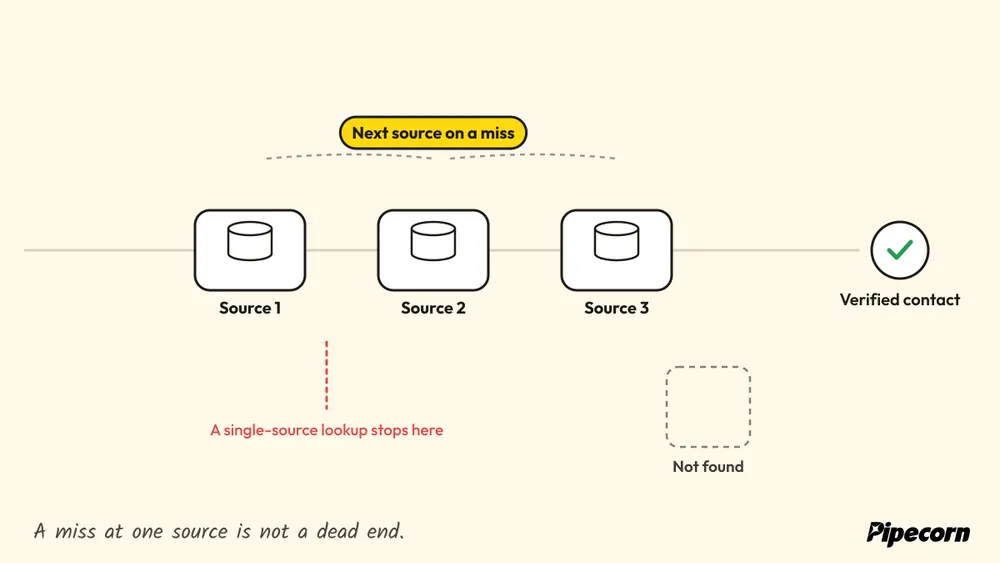
The product framing is also broader than email alone. Pipecorn positions the Chrome extension as part of an outbound data system with real-time sourcing, AI cleaning, job-change alerts, and automated delivery into CRMs and sales engagement tools. The public material also says the extension is available from the Free plan and can reveal contacts on LinkedIn and websites, which makes it useful for reps who want browser speed without giving up verification and routing.
Practical rule: if your team already uses a verifier, a sequencer, and a CRM, measure the extractor by how cleanly it feeds those systems, not by how many raw hits it shows on screen.
A few details make it the most stack-friendly option in this list. Pipecorn says it includes an API, compliance controls such as SOC 2 Type II, GDPR, and CCPA, and tiered routing options for larger customers. That combination matters because the tool is clearly designed to slot into a waterfall-first workflow, not replace the rest of your outbound stack.
Why it ranks high
- Extreme coverage: the waterfall model reduces blind spots by querying many providers instead of relying on one source.
- Verification-first economics: the system is designed around verified contacts, which keeps bad data from polluting downstream outreach.
- Workflow fit: the Chrome extension, API, CRM delivery, and sales engagement support make it a sourcing layer rather than a dead-end scraper.
- Compliance posture: Pipecorn publicly ties the product to enterprise-grade governance and privacy obligations.
Trade-off to watch
- Credit planning matters: waterfall enrichment can be more expensive if your teams use it casually or at very high volume.
- Coverage can still vary by geography and niche: aggregation helps, but no multi-source system removes every gap.
For a deeper look at how the stack is designed, the waterfall enrichment guide is the most relevant companion. If your team wants an outbound workflow that feeds verified contacts straight into CRM and engagement tools, start with the Pipecorn website and compare its output against your current source of truth. The sourcing model is also easy to evaluate against how Eludic finds converting email addresses if you're benchmarking lead discovery tactics.
2. Hunter – Email Finder for Chrome
Hunter gives a browser extension more sourcing discipline than most Chrome email extractors. While you browse company sites or LinkedIn, it surfaces publicly available work emails and shows source URLs and discovery dates for each result, so reps can judge whether a contact is current before they use it. That matters because stale data is one of the easiest ways to waste outbound effort, especially when a tool hides how it found an address.
The browser layer is useful because it keeps the discovery step visible. Hunter supports domain search and person-level email finding, and it pairs with Hunter's verifier so teams can check an address before they send. For outbound teams that treat the Chrome extension as a sourcing layer, not a database, that traceability is a real advantage.
What Hunter does well is reduce guesswork. A rep can open the extension on a company page, see the contact context, and decide whether the result is worth saving without bouncing between tools or treating every reveal as equally reliable. That is a practical fit for teams that already have a separate CRM and outreach workflow.
Why it stands out
Hunter is strongest in public-web prospecting where source visibility matters more than raw volume. The extension fits a rep who is already on a company website or LinkedIn and wants a quick read on whether a contact is worth pursuing, along with enough provenance to review the record later. The interaction stays simple, which helps when speed matters more than layering on more workflow steps.
Its restraint is part of the appeal. Hunter stays focused on discovery, source clarity, and export, rather than trying to replace a full outbound stack. That makes it easier to assess against a sourcing workflow that already includes verification and CRM handoff, because the extension is doing one job and showing how it did it.
Best fit and trade-offs
Hunter works best when you want browser-native discovery with provenance, not phone-heavy enrichment or broad automation across the rest of the stack. It also fits teams that already verify contacts elsewhere and push them into a CRM after capture.
- Best for: public-domain prospecting, quick website sweeps, and teams that want visible sourcing.
- Less ideal for: phone-first workflows and teams that need mobile discovery.
- Trade-off: coverage can be thinner for newer domains or companies with less public footprint.
For teams comparing the extension against other sourcing layers, the key question is whether the browser tool shows where the address came from and when it was seen. Hunter does, and that is why it stays near the top of an email extractor addon for Chrome review. If you want a broader market comparison, the most relevant follow-up is Pipecorn's Hunter alternatives guide.
3. Snov.io – Email Finder Chrome Extension
Snov's extension is strongest as a sourcing layer that stays attached to the rest of the outbound workflow. It finds and verifies emails on the fly across websites and LinkedIn, then sends prospects into Snov's sequences or exports them for later use. That makes it less useful as a standalone extractor and more useful as the first step in a stack that already plans to verify, sequence, and hand off records.
That matters because browser email tools fail most often at the handoff. If a rep has to capture a contact in one place, verify it somewhere else, and then move it again before outreach, time and context get lost. Snov reduces that friction by keeping discovery and next action close together, which is where browser extensions earn their keep.
Find the email in one tab, verify it in another,
then carry it into the CRM by hand:

Why it stands out
Snov's main advantage is the way it combines discovery with follow-through. Its browser extension supports LinkedIn and website capture, while the wider platform adds verification and deliverability tooling for teams that want the same vendor to cover several steps in the pipeline. In practice, that makes it easier to compare against other extensions on coverage, verification depth, integrations, and pricing transparency, because the product is doing more than just returning an address.
The free starting point is also useful for fit testing. Teams can check how well it handles their own target accounts instead of relying on feature lists alone, and that is a better way to judge whether the credits, export flow, and sequence tools fit the team's process. For outbound teams that prospect from LinkedIn every day, the extension feels familiar enough to use without much setup, but the question is whether the bundled workflow is worth the extra weight.
Best fit and trade-offs
The trade-off is clear. Snov asks you to accept a credit-based model and a broader platform shape, which works well if extraction is only one part of your motion, but feels heavier if you only need raw contact sourcing. Teams that already have a CRM and sender stack they trust may find that the extension overlaps with tools they are already paying for.
- Best for: teams that want extraction plus outreach in one platform.
- Less ideal for: users who already have a CRM and sender stack they like.
- Trade-off: the broader platform can feel heavier than a dedicated browser extractor.
Snov is strongest when extraction is the first step in a larger outbound workflow, not the final step.
For teams comparing browser workflows, the useful question is whether the extension saves a handoff, not just a click. If you want a second source on the product family, see the Pipecorn Snov alternatives guide.
4. Apollo.io – Chrome Email & Phone Finder
Apollo's Chrome extension sits at the intersection of contact sourcing and pipeline motion. Reps can reveal emails and direct dials on LinkedIn or company sites, then move those prospects into lists or sequences without leaving the browser. The practical result is not just faster lookup, but fewer handoffs between sourcing, enrichment, and outreach.
That workflow matters because Chrome email extractors rarely succeed as standalone databases. Their value shows up when they can feed a waterfall process, pair with verification, and push clean records into the CRM or sequence layer with minimal friction. Apollo is strong on that stackability, which is why it reads more like a sourcing layer than a point tool.
| Extension | After the reveal, as this review describes it |
|---|---|
| Pipecorn | Automated delivery into CRMs and sales engagement tools, plus an API |
| Hunter | Source URL and discovery date on each result, then export |
| Snov.io | Into Snov's sequences, or exported for later use |
| Apollo | Into Apollo lists or sequences without leaving the browser |
| Seamless.AI | CRM sync from the in-page sidebar |
| Lusha | Selected records passed into connected sales tools |
| LeadIQ | De-duplicated against the CRM, then pushed to Outreach, Salesloft, HubSpot or Salesforce |
| ContactOut | Bulk enrichment from LinkedIn profile URLs |
| RocketReach | Team management and bulk options |
| GetProspect | CRM sync and Google Sheets export |
Coverage, verification, and stack fit
Apollo's browser layer gives reps enough context to decide whether a contact is worth pursuing before they spend time on manual enrichment. The sidebar can surface company information, and the extension can pass contacts into Apollo workflows from the page they are already on. That keeps the workflow anchored in browsing, which is useful for teams that source directly from search results and LinkedIn.
Its stronger case is not raw extraction alone. It is the way contact discovery connects to the rest of the system, especially if your process already depends on sequencing and CRM sync. In that setup, the extension reduces the number of places a rep has to touch a lead record.
Best fit and trade-offs
Apollo works best for teams that want the browser to be a sourcing entry point into a larger sales system. It is a cleaner fit when the extension is part of a repeatable outbound motion, not a one-off lookup tool. That also makes it easier for managers to standardize how reps capture and move leads.
The trade-off is scope. If your team only needs a lightweight email extractor, Apollo can feel broader than necessary, especially when another stack already handles sequencing or CRM updates. Credit and seat usage can also become harder to justify if the extension is used for simple lookups that do not feed the rest of the platform.
- Best for: teams that want browser-based sourcing connected to outreach and CRM flow.
- Less ideal for: users who only need a narrow extractor with minimal platform overhead.
- Trade-off: the broader platform can add cost and process weight if usage is not tightly managed.
Apollo ranks well when the comparison is not just “who finds the contact,” but “who gets the contact into motion with the fewest extra steps.”
5. Seamless.AI – Chrome Extension
High-volume browser prospecting often fails for a simple reason, reps spend too much time moving between tabs, tools, and CRM updates. The Seamless.AI extension is built to reduce that friction by keeping contact data, company context, and mobile numbers inside the browser while reps work LinkedIn, company sites, and search results.
The extension feels closer to a sourcing console than a narrow email extractor. That matters if your team treats the browser as the first layer of a broader outbound system, because the value is not just revealing a contact, it is pushing that contact into a workflow that can include verification, sequencing, and CRM sync.
Why it stands out
Its main strength is breadth inside the browser. Reps who work through long prospecting queues can keep discovery and list building in one place, which lowers the number of handoffs between finding a lead and using it.
The tool also emphasizes mobile numbers, which gives it more value for teams that care about direct connect potential instead of email-only sourcing. That wider contact mix can matter when outreach needs more than one route to reach a decision-maker.
Data quality is the part to test carefully. Coverage and accuracy can shift by segment, so the extension works best as a sourcing layer that you validate against your ICP, not as a blanket assumption that every search will return the same result. In a stack with real-time verification and CRM push, it can save time. On its own, it is still only one part of the process.
Best fit and trade-offs
The Seamless.AI extension is aimed at reps who prospect in the browser all day and need fast access to contact data without leaving the page. It fits teams that run a high-volume motion and can afford to govern usage closely, because aggressive browsing can burn through allowances quickly.
A rep revealing every profile they open, just to see.
The team credit balance by Friday:

The trade-off is control. If your team needs strict cost discipline, the tool can feel harder to justify for simple lookups that do not feed a larger workflow. That makes it better for organizations that will use the browser as a sourcing layer, then move the result into verification, sequencing, or CRM routing right away.
- Best for: high-volume browser prospecting with a mobile-first contact mix.
- Less ideal for: teams that need tight spend control and predictable coverage.
- Trade-off: the workflow rewards speed, but only when usage is managed against your ICP and downstream process.
This tool deserves a pilot if your team's real goal is to keep sourcing close to the browser and hand off cleaner leads into the rest of the stack.
6. Lusha – Chrome Extension
Lusha's browser extension is designed to reveal business contact and company data while reps work on LinkedIn, Salesforce, or company websites. That makes it a practical fit for teams that want email and phone discovery in the same browser workflow rather than a page-only email scraper.
Why it stands out
The extension combines person-level contact data with company context and can pass selected records into connected sales tools. Lusha also offers a free account, but credits, export limits, and available integrations vary by plan, so test the exact workflow and target market before committing.
Best fit and trade-offs
- Best for: reps who want email and phone discovery across LinkedIn and company pages.
- Less ideal for: teams that need a transparent multi-provider waterfall or predictable high-volume unit economics.
- Trade-off: convenient browser access, but coverage and credit consumption still need to be benchmarked against your ICP.
Use a controlled pilot: run the same account sample through Lusha and your current provider, then compare verified contact rate, direct-dial coverage, duplicates, and cost per usable record.
7. LeadIQ – Chrome Extension (Identify)
LeadIQ is the hygiene-first pick in this comparison, and its value comes from where it sits in the sourcing flow. The extension captures emails and mobile numbers from LinkedIn and Sales Navigator, but its more distinctive function is what happens before records reach your CRM. It de-duplicates against your CRM and pushes status-aware records into systems like Outreach, Salesloft, HubSpot, or Salesforce.
What it does well
That push-to-stack behavior is why LeadIQ matters to RevOps and SDR managers. The extension is not trying to act as a standalone database. It is trying to keep data clean as it moves from browser to CRM to engagement tool, which matters in orgs where duplicate ownership and messy handoffs create operational drag.
The workflow also fits teams already working in Outreach or Salesloft. If reps prospect on LinkedIn and then hand the lead into an existing motion, LeadIQ keeps the browser layer aligned with the rest of the stack. That makes it more of a routing and intake control point than a raw sourcing engine.
Best fit and trade-offs
The trade-off is coverage. It is not a full replacement for a broader sourcing database, so teams that need wider reach may still need another tool alongside it.
Practical rule: use LeadIQ when the main problem is bad CRM intake, not when the main problem is finding any contact at all.
- Best for: RevOps-led teams that care about duplicates and clean CRM entry.
- Less ideal for: teams wanting a full database substitute.
- Trade-off: it solves intake quality better than it solves blind spots.
LeadIQ fits best as a sourcing layer that respects CRM ownership rules. That makes it a strong middle-ground tool for teams that already trust their outbound stack and want the browser capture step to fit it cleanly.
8. ContactOut – Chrome Extension for Emails & Phones
ContactOut is built for recruiting workflows and for prospect lists where standard corporate contact data falls short. The Chrome extension surfaces personal and work emails, plus phone numbers, on LinkedIn, and it also supports bulk enrichment from LinkedIn profile URLs. That mix makes it useful when a company address is missing but the team still needs another path to a real person.
Coverage and workflow fit
The strongest part of ContactOut is contact breadth. Recruiters often need more than a work email, and sales teams working hard-to-reach segments often need the same mix of fields. The browser extension keeps lookups fast, while the bulk enrichment option gives operations teams a way to process profile URLs without relying on one-off manual searches.
That matters because the tool is doing sourcing work, not replacing a database. In a stack that already includes a CRM, enrichment layer, or outbound platform, ContactOut can fill gaps at the browser step and hand cleaner contact options into the next system.
Chrome-only support also makes rollout simpler in controlled IT environments. That is not a feature buyers brag about, but it can decide whether a tool gets adopted at all when browser standards are tightly managed.
Verification depth and pricing trade-offs
The main limitation is judgment, not access. Personal email discovery can help surface a contact path, but teams still need to decide when that address belongs in a recruiting motion or a sales workflow. Phone-heavy use and bulk enrichment can also use credits quickly, so cost control matters if the extension becomes part of everyday sourcing.
A second trade-off is verification depth. ContactOut is useful for finding alternate contact routes, yet teams that depend on strict validation before CRM push may still want a verification layer in front of outreach. That makes it better as a sourcing layer than as the final source of truth.
- Best for: recruiting teams and sales orgs that need alternate contact paths.
- Less ideal for: teams with strict rules around personal contact use.
- Trade-off: broad contact coverage, but more responsibility on data governance and spend control.
If your goal is to keep stubborn prospects moving through a multi-tool stack, ContactOut is one of the more practical browser-side options.
9. RocketReach – Chrome Extension
RocketReach is best treated as a fallback source inside a broader sourcing stack. Its Chrome extension can surface emails, some phone numbers, and social links for people and companies while users browse LinkedIn and the open web, which makes it useful when a primary provider misses a contact or returns partial records.
What it does well in practice
The main strength is redundancy. Outbound teams rarely get complete coverage from one provider, so a second-source extension can fill gaps without forcing reps to restart the lookup process. RocketReach keeps the workflow familiar, which reduces training overhead for teams already using a reveal-and-export motion.
That matters most in stacks that already have a CRM, an enrichment layer, or a separate outbound platform. RocketReach can sit at the browser step, capture additional contact paths, and pass those options into the next system instead of trying to act as the final database.
It also includes team management and bulk options, so it is not limited to solo prospectors. For distributed sales organizations, that makes it more practical than a lightweight lookup tool that only handles one-off searches.
Coverage, verification, and pricing trade-offs
RocketReach's limits are the same ones that define many backup sources. Coverage can vary by industry and region, so it works best as a fill-in tool rather than a primary source of truth. Verification depth also matters here. If a team needs strict validation before CRM push or outreach, RocketReach may still need to sit in front of a dedicated verification layer.
Pricing and credit usage deserve close review as well. The extension can become expensive if it turns into an everyday sourcing step, especially for phone-heavy workflows or larger teams that run through credits quickly. That makes pricing transparency and usage discipline part of the buying decision, not an afterthought.
- Best for: teams that need a fallback source to fill coverage gaps.
- Less ideal for: buyers looking for a primary source of truth.
- Trade-off: useful breadth, but pricing and credit use need active management.
For teams that want another browser-side source to keep prospecting moving, RocketReach is a practical option. For teams that need the cleanest path from extraction to verification to CRM push, it works better as one layer in a stack than as the system of record.
10. GetProspect – LinkedIn Email Finder (Chrome)
GetProspect is a focused LinkedIn and Sales Navigator capture tool for teams that want verified emails without overcomplicating the browser workflow. It's positioned well for agencies and LinkedIn-heavy SDR teams that want extraction, verification, and export in one straight path.
Why it stands out
The extension is straightforward. It captures from profiles and search results, adds enrichment fields, and supports CRM sync and Google Sheets export. That simplicity matters if your users aren't power buyers and just need a dependable browser capture motion.
GetProspect also makes sense as an affordability-oriented option for teams that prospect mainly inside LinkedIn. If your process is profile-first, its narrow focus can be an advantage because it doesn't bury the rep in extra controls.
Best fit and trade-offs
The trade-off is obvious, it's narrower outside LinkedIn and company pages. Credit management also needs care on larger teams, which is common for browser-based tools in this category.
- Best for: LinkedIn-centric teams and agencies.
- Less ideal for: broader sourcing strategies that need more than browser capture.
- Trade-off: narrow focus keeps the UI clean, but limits coverage breadth.
For teams that want a simple browser extractor with a familiar workflow, GetProspect is a credible contender. For teams that want sourcing plus downstream orchestration, it's more of a component than a platform.
Choosing the Right Chrome Email Extractor for Your Stack
The right email extractor addon for Chrome depends on what happens after the reveal. If your team wants raw browser speed, Hunter and Apollo are the easiest pilots because they keep reps inside the tab and make contact discovery feel immediate. If recruiting is the primary use case, ContactOut deserves a hard look because alternate contact paths matter more there than in standard SDR workflows.
For hygiene-first RevOps, LeadIQ is the cleanest fit because it treats CRM intake as part of the job, not an afterthought. If your team cares most about coverage, verification depth, and direct push into CRM and sales engagement, benchmark a waterfall engine like Pipecorn against your incumbent before you standardize anything. That's the only way to know whether a single-source browser tool is leaving money on the table.
| Extension | Best for | Less ideal for |
|---|---|---|
| Pipecorn | Waterfall email and phone enrichment pushed into CRM and engagement tools | Casual or very high-volume use without credit planning |
| Hunter | Public-domain prospecting, quick website sweeps, visible sourcing | Phone-first workflows and mobile discovery |
| Snov.io | Extraction plus outreach in one platform | Teams that already have a CRM and sender stack they like |
| Apollo | Browser sourcing connected to outreach and CRM flow | Users who only need a narrow extractor |
| Seamless.AI | High-volume browser prospecting with a mobile-first contact mix | Teams that need tight spend control and predictable coverage |
| Lusha | Email and phone discovery across LinkedIn and company pages | Teams that need a multi-provider waterfall or predictable high-volume costs |
| LeadIQ | RevOps-led teams that care about duplicates and clean CRM entry | Teams that want a full database substitute |
| ContactOut | Recruiting teams and sales orgs that need alternate contact paths | Teams with strict rules around personal contact use |
| RocketReach | A fallback source to fill coverage gaps | Buyers looking for a primary source of truth |
| GetProspect | LinkedIn-centric teams and agencies | Sourcing strategies that need more than browser capture |
A good buying process is simple. First, benchmark accuracy against a real ICP list, not a vendor demo list. Second, check GDPR and CCPA posture, plus how your team handles public-source collection and opt-outs. Third, model credits against your actual monthly workflow so you don't buy a tool that looks cheap but burns value on failed lookups. Fourth, map integrations before rollout, because an extractor that doesn't push cleanly into your CRM just creates another manual step.
- Benchmark accuracy. Run a real ICP list through the extension, not a vendor demo list.
- Check compliance. Review GDPR and CCPA posture, and how your team handles public-source collection and opt-outs.
- Model credits. Price your actual monthly workflow, failed lookups included.
- Map integrations. Confirm the extension pushes cleanly into your CRM before rollout.
If you're building outbound around sourcing rather than static databases, treat the browser extension as the entry point, not the finish line. The right stack should extract, verify, enrich, and route contacts with minimal friction. That's how a Chrome addon becomes part of a reliable outbound system instead of a shortcut that looks fast and creates cleanup later.
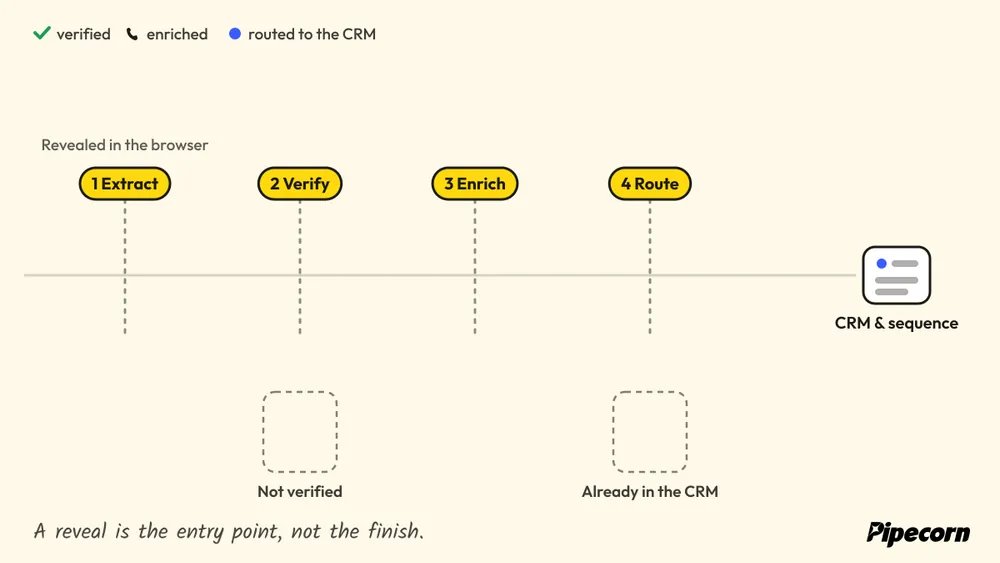
Pipecorn is built for teams that want more than a browser reveal. It combines waterfall sourcing, real-time verification, AI cleaning, and CRM delivery so Chrome extraction becomes part of a verified outbound workflow. If that's the direction you're heading, visit Pipecorn and compare its sourcing layer against your current Chrome extension before you commit.