
How to track website visitors?
Discover how to effectively track website visitors worldwide with top tracking tools. Analyze website traffic, behavior, and referral channels for insights.

On this page
Hey there! 👋
We’ve cracked the code on a powerful strategy that generates 40–60% of meetings using this simple workflow: Tracking website visitors to engage them.
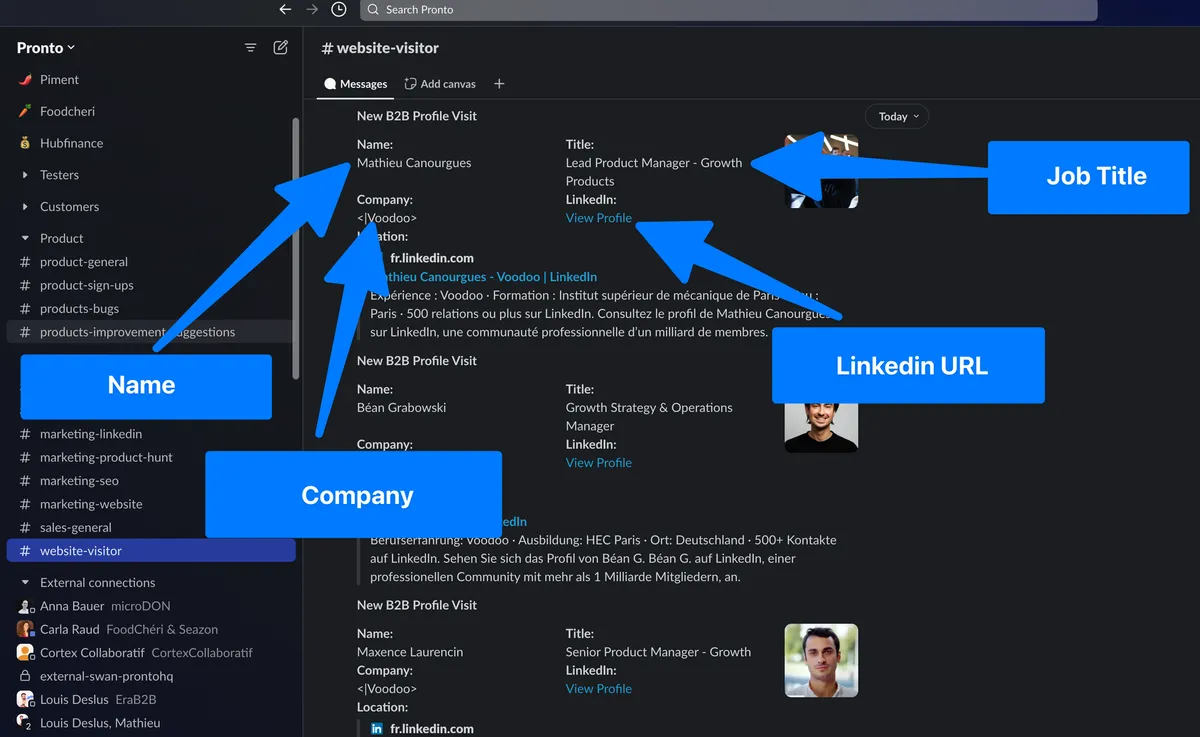
Yes, I’m talking about identifying the exact companies and even the people who have been visiting your website. Imagine the potential: you can then reach them out with a super precise message because you know it’s the perfect moment. And don’t worryI explain the perfect outreach message to use at the end of this tutorial.
Just make sure your own digital presence is polished toosomething as simple as a clean, professional profile picture maker can instantly boost credibility when your name or LinkedIn gets checked during outreach.
When my cofounder shared this exact strategy on LinkedIn, we hit 400 comments in just 10 hours! The response was incredible and showed just how much potential this method has to turn into a sales machine when done right.

Now, here’s the catch: tracking website visitors in Europe can be tricky due to GDPR regulations. Tools like Google Analytics won’t tell you who is visiting your site, leaving a major gap in your ability to follow up on potential leads. But with this workflow, you can bypass that limitation in a fully GDPR-compliant way by leveraging company-level data.

Since installing this workflow, we’ve seen a 16% increase in closed deals — proof that identifying intent at the right moment can dramatically impact your results.

This strategy works incredibly well for companies whose target customers have fewer than 200 employees. For larger accounts, it’s still effective, but you’ll need to be super accurate with your personasthink roles like "Workspace Manager" or "CSR Director."
In this guide, I’ll show you step-by-step how to set everything up. And don’t worryI’ll walk you through each part in the accompanying videos so you can easily replicate it for your business.
Here are the 5 steps we’ll cover:
- Identify the companies visiting your website using a tracking tool like Clearbit.
- Automate data collection to create a pipeline of enriched information about these visitors.
- Build a prospects list in LinkedIn Sales Navigator to identify the right decision-makers within those companies.
- Filter and qualify prospects, and exclude your existing customers to focus on new leads.
- Engage with leads strategically, using smart outreach that prioritizes value over intrusion.
If you want to watch the ultimate tutorial in video:
Tired to do it alone? I can implement it for you for free > Book a meeting with me here.
If you want to learn step by step... Let’s dive into the details! 👇

Step 1: Use a Tool to Identify Companies Visiting Your Website
The first step is finding a tool that tells you which companies are visiting your website. I'm using Clearbit in this example, but there are other options like Albacross or Snitcherfeel free to try a few and pick your favorite.
Clearbit Sign-Up Hack

Clearbit works with HubSpot now, so if you don't already have a HubSpot account, you'll need one. But no stress, I've got a hack for you:
1. Go to Google, search for "Clearbit Sign Up", and click the first link.
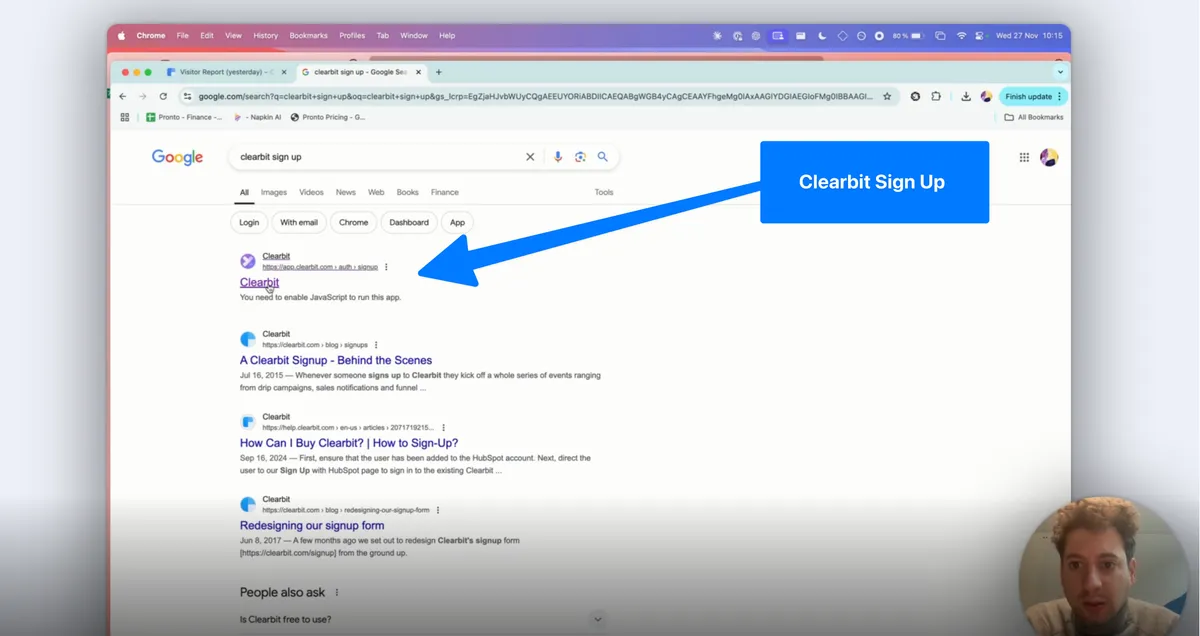
2. Don’t have HubSpot? Just sign up for a free HubSpot accounteasy peasy!
3. Once you're in, connect Clearbit to your website and grab the tracking code.
Paste that code onto your site, test the integration, and voilàyou’re ready to track your visitors. Clearbit will start showing you which companies are visiting, how often, and even the specific pages they check out.
👉 Watch the video to see the entire sign-up and setup process step-by-step.
Tired to do it alone? I can implement it for you for free > Book a meeting with me here.
Step 2: Automate Data Collection with N8N
Now comes the fun partautomation. I use N8N, which is a visual tool that makes setting up workflows ridiculously easy.
Here's what my automation does:
- It connects to Clearbit's API every day and pulls in the latest data about website visitors.
- Then, it enriches this data by adding company detailsthings like LinkedIn URLs, domains, and more.
- I clean up the data, filter it for relevant companies, and format it nicely.
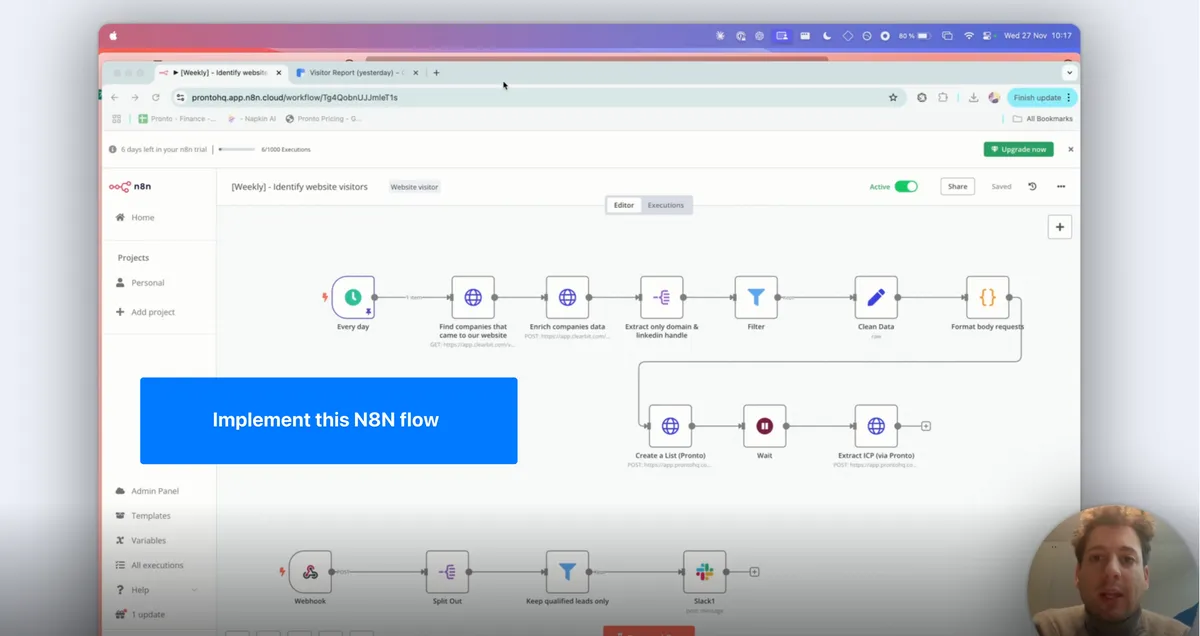
At the end of this step, you'll have a shiny list of companies, all ready for the next phase.
👉 Don't worry if this sounds complicatedI’ll guide you through the exact setup in the video.
Tired to do it alone? I can implement it for you for free > Book a meeting with me here.
Step 3: Create a Prospects List in LinkedIn Sales Navigator
Next, we take that list of companies and work some LinkedIn magic with Sales Navigator. Here's what I do:
1. Use a tool like Pipecorn to upload the company list into Sales Navigator. To access Pipecorn's API, it’s simple:
- Create an account on Pipecorn's website.
- Sign up for the Professional Plan to unlock API access.
- Read the documentation at docs.pipecorn.com to get started seamlessly.
If you need help me, contact me by LinkedIn. I would be super happy 🦁
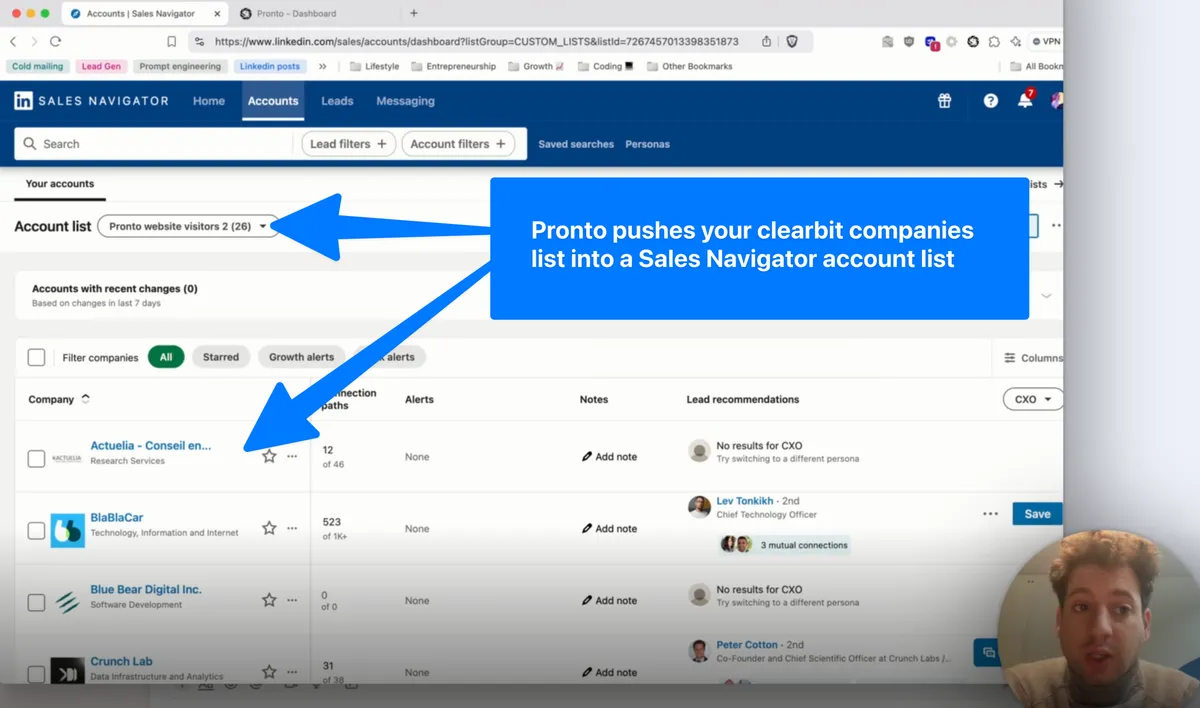
2. Define my target personas. For example, I look for Growth Managers and Heads of Growth — the people I know will be interested in my service.
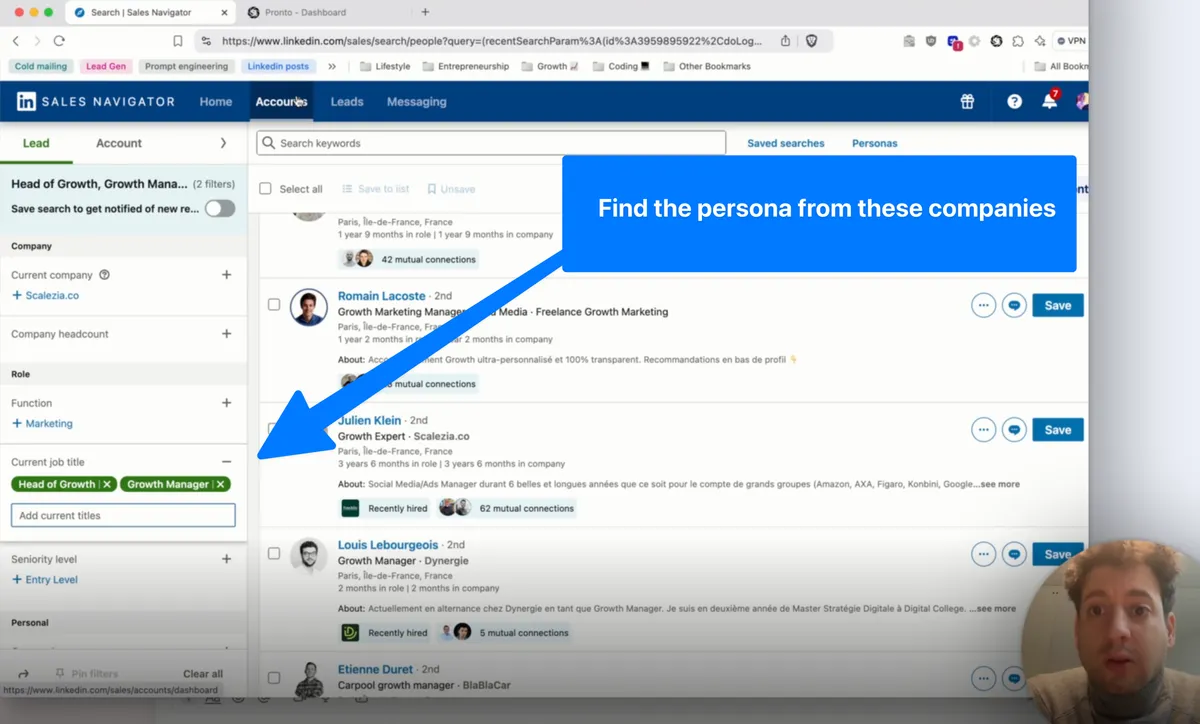
3. Run a search to find matching profiles from those companies.
In minutes, you'll have a personalized list of potential leads. No more wasting time on irrelevant contacts!
👉 Check out the video to see how to upload your list and find the right prospects.
Tired to do it alone? I can implement it for you for free > Book a meeting with me here.
Step 4: Filter and Qualify Prospects
At this stage, you've got a solid list of profiles. But not everyone is a perfect fit, so we need to filter out the noise:
- For example, students or people in unrelated roles aren't useful for me.
- Go through the profiles and disqualify anyone who doesn't match your criteria.
- Focus on the goldthose who align perfectly with your persona.
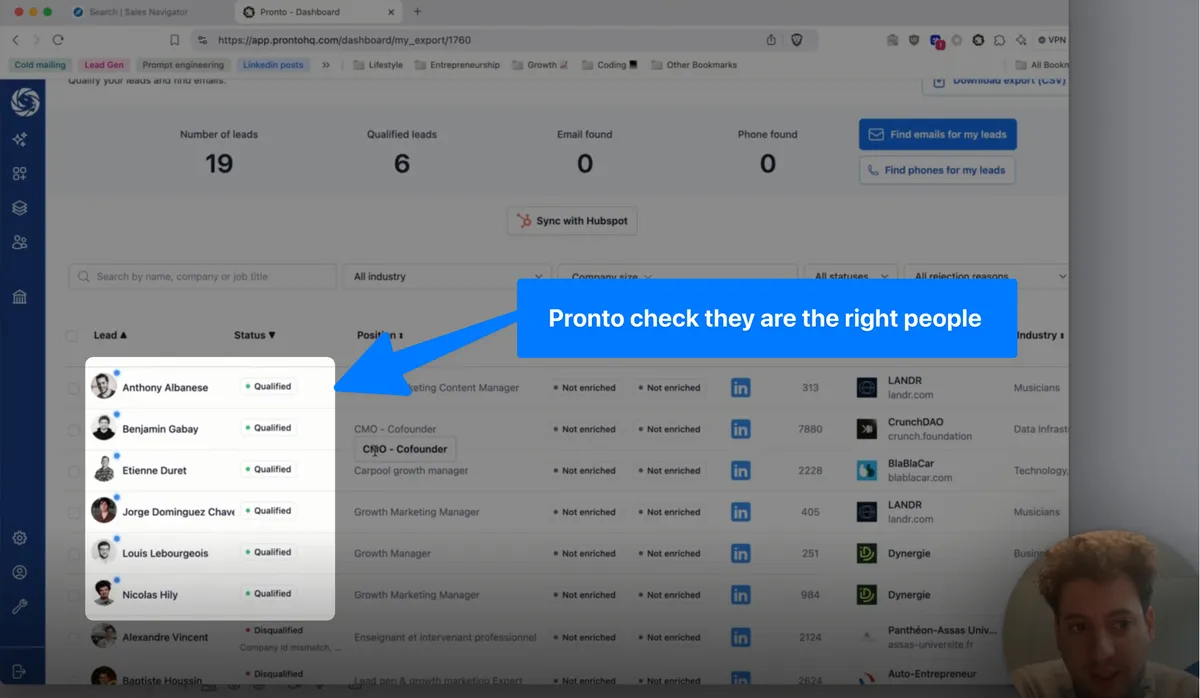
Want to take it a step further? Exclude your current customers to ensure you’re focusing only on new prospects. This can help you target fresh opportunities without wasting time or duplicating outreach.
For instance, I filter out anyone who isn't directly involved in growth roles. By doing this, you're left with a laser-focused list of qualified leads.
👉 I’ll show you exactly how I qualify and filter my prospects in the video.
Tired to do it alone? I can implement it for you for free > Book a meeting with me here.
Step 5: Engage with Leads Strategically
Before assigning a visitor account to sales, separate demand generation, lead capture and sales readiness. A company-level signal supports research; it does not identify the individual visitor or prove that person requested a call.
Now that you’ve gathered intent signals from your visitors, it’s time to reach out. But here’s the thing: one of the biggest mistakes people make is referencing the intent too directly in their messaging.
For example:
❌ "I saw you visited our website and wondered if…"

No! That’s way too intrusive and can make people feel uncomfortable. Instead, you need to be smart and bring value first:
- For a CMO, send high-level strategic insights that resonate with their priorities.
- For Growth professionals, share actionable guides or automation tips that improve their day-to-day tasks.
- Share content that aligns with the visitor's role and challenges:
- Make your outreach relevant and valuable without revealing the source of your insight. Let the visitor feel like your timing is a coincidence, not a reaction to their site visit.
Note:
We can’t be 100% sure that the person you’re contacting is the exact one who visited your website. But we are 100% sure it’s either them or one of their colleagues. Either way, this is the perfect moment to reach out. The intent is therethey’re currently experiencing the pain point your solution addresses. Maybe they’re benchmarking solutions, so don’t miss this opportunity!
Pro tip: Set up Slack notifications for real-time alerts on qualified visitors. This way, you can respond quickly and strategically without being too pushy.
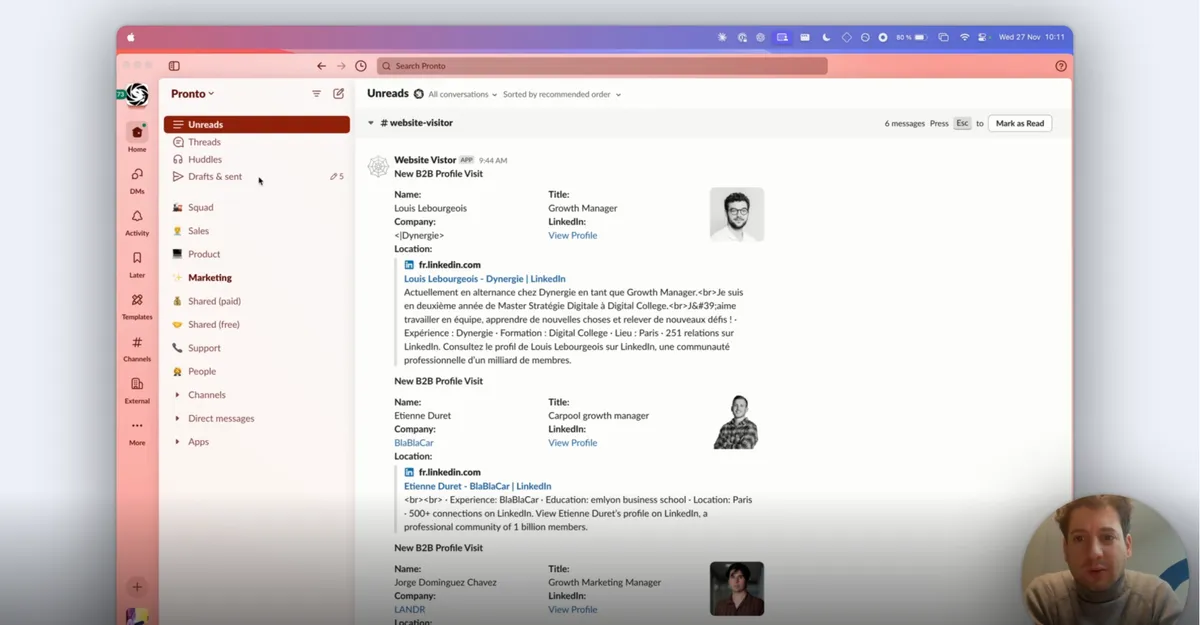
👉 Watch the video to see the exact messaging strategy and how to automate Slack alerts.
Tired to do it alone? I can implement it for you for free > Book a meeting with me here.
Need help?
This strategy is a game-changer. When done right, it can transform your website traffic into a sales machine.
We've started to implement this workflow in +150 companies. Results are higher than expected. We are still improving the flow excluding your existing customers ;)
If you want to test this workflow for your business, feel free to reach out to me on LinkedIn or send me an email at mathieu@pipecorn.comI’d love to help you set it up!
Catch you soon, and happy tracking! 🚀