
Master Your Sales Navigator Inbox [Guide 2026]
Overwhelmed by LinkedIn messages? Master the Sales Navigator inbox to organize your conversations, boost lead generation, and streamline your sales strategy.

![Master Your Sales Navigator Inbox [Guide 2026] cover](https://cdn.prod.website-files.com/66e2b74a4b25ba70adce8eb2/67f9133f5091db5dcff7484a_67b70a2aac6d369eb533cd8c_67a63baa135ae2c0ac5476a6_103.jpeg)
On this page
- 01What is Sales Navigator inbox?
- 02How to manage messages in Sales Navigator?
- 03What is the difference between inboxes?
- 04How to send an InMail message?
- 05How to access Sales Navigator inbox?
- 06What are InMail credits?
- 07How to generate leads using Sales Navigator?
- 08How to Level Up Prospecting with Sales Navigator Email Scraper
Between your regular LinkedIn inbox and the Sales Navigator inbox, things can get messy fast.
Here’s what you’ll learn:
✅ The essential features of the Sales Navigator inbox
✅ How to manage and organize your messages like a pro
✅ The real difference between LinkedIn’s inboxes (and when to use each)

Let’s clean up the mess and put your messaging strategy on autopilot.
What is Sales Navigator inbox?
Think of it as mission control for your sales conversations.
The Sales Navigator inbox is a dedicated messaging hub built specifically for sales professionals. Unlike the basic LinkedIn inbox, it offers advanced features made for prospecting, outreach, and follow-up so you never lose track of a potential deal.
Pro Tip: Using the Sales Navigator inbox can significantly streamline your sales communication process.
How to manage messages in Sales Navigator?
Message overload? Not anymore.
With the right approach, your inbox can become a clean, high-performing space. Here’s how to make it happen:
🗂️ Use inbox management tools to categorize your messages
🔔 Set up Sales Navigator alerts to stay updated on important conversations
🔍 Use filters in the messages tab to quickly find specific conversations
📊 Check conversation insights to understand engagement levels
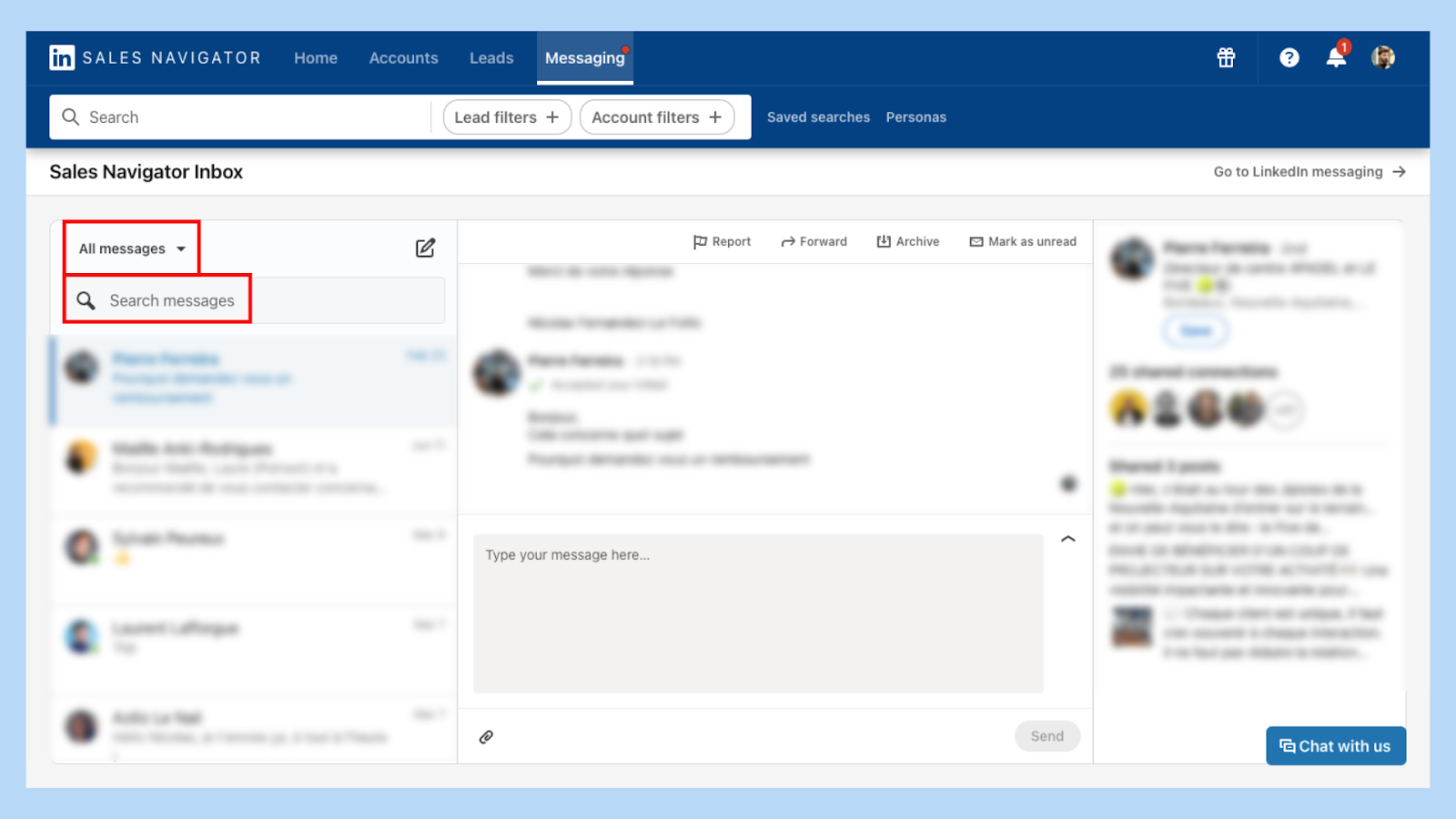
Pro Tip: Regularly reviewing your conversation insights can help you tailor your approach for better responses.
What is the difference between inboxes?
LinkedIn inbox and Sales Navigator inbox look similar. But they work very differently.
Here’s a side-by-side breakdown to clear things up:
Understanding the difference helps you use each inbox effectively, ensuring you don't miss out on key conversations.
Pro Tip: Use the Sales Navigator inbox for sales-related messages and the regular inbox for networking.
How to send an InMail message?
Ready to break past 1st-degree walls? InMail is your access pass.
Here’s how to send one that gets noticed:
1️⃣Log into yourSales Navigator account.

2️⃣ Search for the lead or account you're interested in.
3️⃣ Open the compose window to send an InMail.
4️⃣ Write a personalized message with a strong subject line.
5️⃣ Hit send and stay alert for the reply.
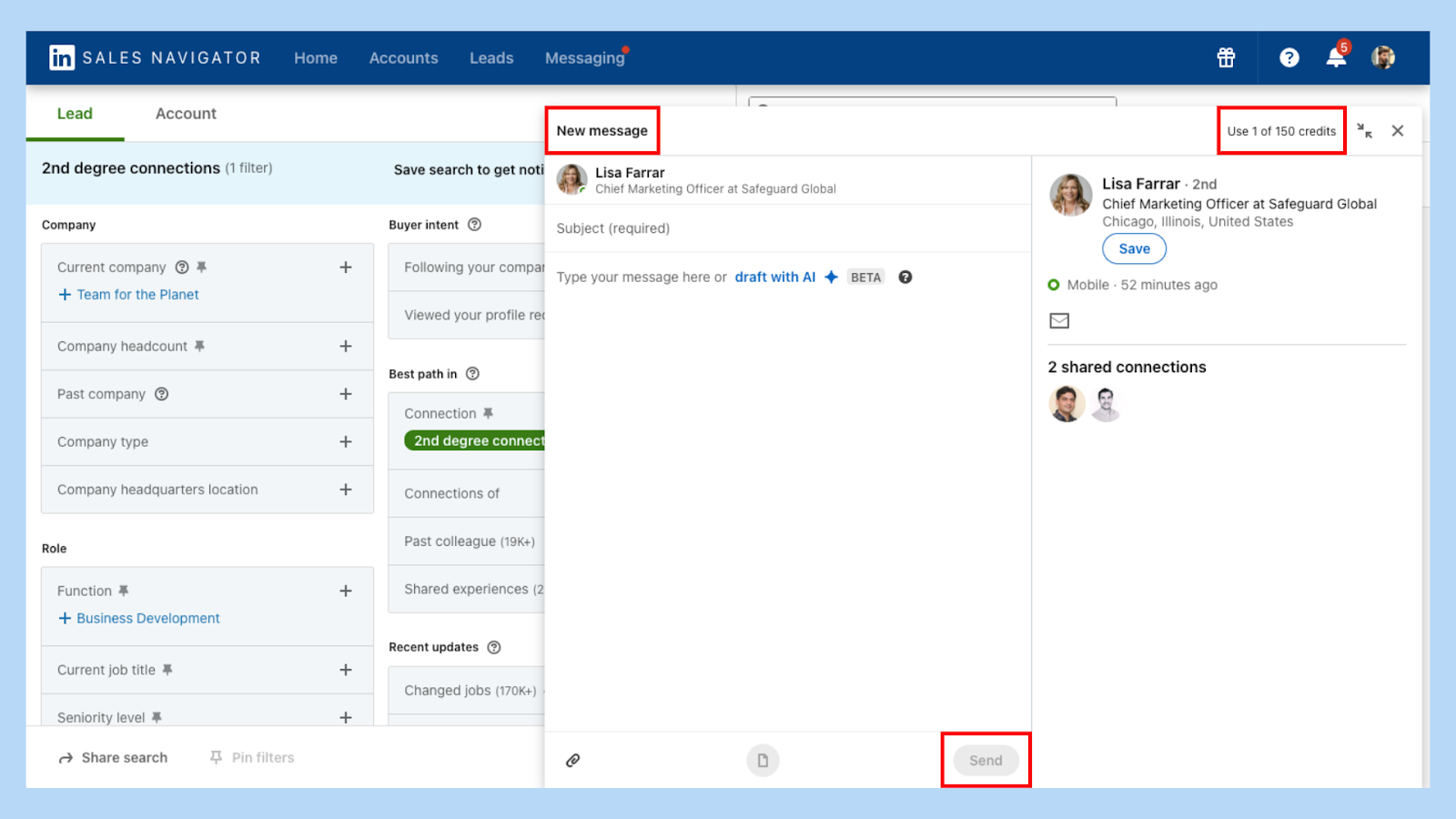
Pro Tip: Personalizing your InMail messages increases the chances of getting a response.
How to access Sales Navigator inbox?
Accessing your Sales Navigator inbox is simple it’s just a couple clicks away.
Here’s how to get there fast:
1️⃣ Sign in to Sales Navigator.
2️⃣ Click the “Messaging” tab at the top of the page.

Pro Tip: Bookmark the Sales Navigator inbox for even quicker access.
What are InMail credits?
InMail credits = access.
These are tokens LinkedIn gives you based on your subscription plan, letting you message anyone regardless of connection level.
Pro Tip: Don’t waste your credits. Focus on leads that match your ICP and show recent activity.
How to generate leads using Sales Navigator?
This is where Sales Navigator shines.
It’s not just a messaging tool it’s a lead generation machine when used right:
🎯 Use lead recommendations based on your preferences.
🗂 Create custom lists to segment your prospects.
💾 Save leads and accounts for quick access in your account lists.
💬 Engage with prospects using personalized InMail messages.

Pro Tip: Update your custom lists regularly to keep your pipeline aligned with your goals.
How to Level Up Prospecting with Sales Navigator Email Scraper
Ready to supercharge your sales efforts? Tools like Sales Navigator email scraper from Pipecorn can take your prospecting game to the next level.
👉 For more insights on effective prospecting, check out this guide on LinkedIn Sales Navigator prospecting.
Remember, the key to successful sales communication lies in understanding your tools and using them effectively. With smart organization, focused outreach, and proper use of InMail credits, you’ll not only streamline conversations, you’ll close more deals.