How to Scrape Data from LinkedIn Sales Navigator?
Learn how to scrape data from LinkedIn Sales Navigator with our expert guide. Discover 3 effective methods and top tools to boost your lead generation today!


On this page
- 01How to scrape data from LinkedIn Sales Navigator?
- 02What tools can I use for scraping?
- 03How to extract email addresses from LinkedIn?
- 04What are the methods for lead generation?
- 05How to automate data extraction from LinkedIn?
- 06What are the best practices for scraping LinkedIn?
- 07How to create lead lists from LinkedIn?
Tired of clicking through endless LinkedIn profiles manually?
If you're in sales or lead generation, you already know LinkedIn Sales Navigator is full of gold but scraping that prospect data efficiently? That’s where the real challenge begins.
This guide will walk you through:
✅ Proven methods to extract data from LinkedIn
✅ The best LinkedIn scraping tools
✅ Tips to uncover verified email addresses
Let’s turn LinkedIn into your most efficient lead machine.

How to scrape data from LinkedIn Sales Navigator?
Want to scrape data from LinkedIn Sales Navigator?
Good call. But first let’s zoom out.
Sales Navigator isn’t just a contact list. It’s a precision tool to find the right prospects, not just any.
Here’s how to make it work for you:
🔍 Use advanced search filters to narrow down your prospect list.
💾 Save your searches for easy access and regular updates.
🚀 Leverage lead recommendations to discover new opportunities.
Pro Tip: Always ensure your methods align with LinkedIn's terms of service to keep your account in good standing.
Follow this approach, and you’re not just collecting names you’re gathering high-quality data that actually drives your sales prospecting efforts forward.

What tools can I use for scraping?
There’s no shortage of LinkedIn scraping tools out there but not all are created equal.
Look for tools that make scraping seamless and safe.
One standout? Pipecorn’s LinkedIn Sales Navigator Scraper Chrome Extension. It’s built for speed and simplicity.
What makes a great scraper?
✅ A clean, user-friendly interface
✅ Built-in compliance with LinkedIn rules
✅ The ability to export your data as CSV
Pro Tip: Using a reliable tool helps you save time and ensures you're collecting quality data for your outreach campaigns.
Remember, the goal is to gather prospect data efficiently and ethically.

How to extract email addresses from LinkedIn?
An email is still one of the most valuable assets in sales.
Here’s how to ethically extract and verify email addresses from LinkedIn profiles:
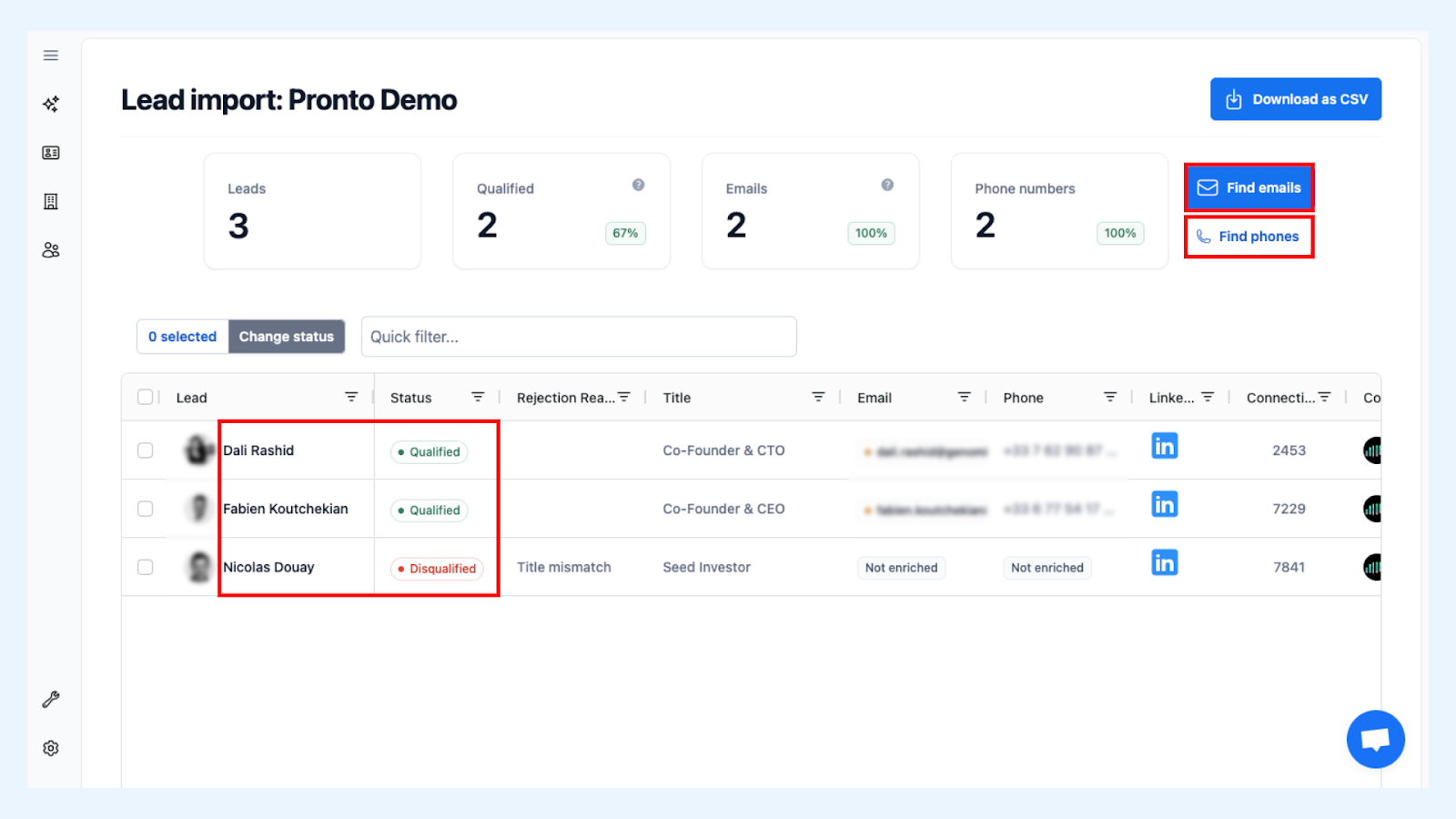
1️⃣ Use email finder tools compatible with LinkedIn
2️⃣ Connect with your prospect first to access more contact details.
3️⃣ Verify the emails to keep a clean contact list.
🛠 Pipecorn’s tools help you do both extract and verify in one smooth process.
When your contact list is clean, your outreach hits harder.
What are the methods for lead generation?
Lead generation isn’t about blasting messages. It’s about talking to the right people at the right time.
Start here:
1️⃣ Define your ideal customer profile(ICP) to target the right audience.
2️⃣ Engage in meaningful LinkedIn outreach by personalizing your messages.
3️⃣ Use lead lists to organize and track your prospects.

Pro Tip: Personalization is key. Tailored messages yield a higher response rate than generic ones.
The better your targeting, the easier the close. Use these strategies, and you’ll build stronger relationships while boosting your chances of turning leads into customers.
How to automate data extraction from LinkedIn?
If you’re still doing it all manually… you’re falling behind.
To automate data extraction the right way:
🔁 Use tools that integrate with the LinkedIn API.
🎯 Set up parameters to scrape LinkedIn Sales Navigator for specific data.
📅 Schedule regular extractions to keep your data up-to-date.
Pipecorn’s automation features handle it all for you so you’re always working with up-to-date prospect data, no extra effort required.

What are the best practices for scraping LinkedIn?
Scraping isn’t a free-for-all do it wrong, and LinkedIn will notice.
Follow these best practices to stay in the clear:
📜 Always comply with LinkedIn's terms of service.
🚫 Avoid excessive data requests to prevent your account from being flagged.
🌐 Focus on gathering publicly available information.
Pro Tip: Ethical scraping not only protects your account but also builds trust with potential prospects.
Follow these best practices to gather valuable data smoothly and without a hitch.
How to create lead lists from LinkedIn?
Good data is only powerful when it’s well organized.
Here’s how to create high-quality, export-ready lead lists:
1️⃣ Use the LinkedIn search feature to find potential leads.
2️⃣ Apply filters like job title, location, and company size.
3️⃣ Save your searches and export them as a CSV file using tools like Pipecorn's Export LinkedIn Sales Navigator List.
Once organized, your outreach becomes faster, sharper, and more effective.
With Sales Navigator, you’re not just upgrading your search you’re upgrading your entire sales pipeline with qualified leads.
Scraping data from LinkedIn Sales Navigator doesn’t have to be risky, slow, or frustrating.
Done right with the right scraping tools and approach it becomes a seamless part of your sales prospecting.
So whether you're collecting emails, building lead lists, or enriching your CRM:
✅ Focus on relevance
✅ Respect ethical boundaries
✅ Use smart tools like Pipecorn’s Sales Navigator Scraper to stay one step ahead
Happy selling and smarter scraping.