9 B2B Lead Generation on LinkedIn Tactics for 2026
Nine practical B2B Lead Generation on LinkedIn tactics for SDR and RevOps teams, covering targeting, outreach, ads, compliance, and enrichment workflows.
Article summary
- LinkedIn is the discovery and intent layer: it finds the right buyer, but the profile does not hand over a verified email address or direct dial.
- Keep Sales Navigator searches few and sharp, tied to buying roles, and map one named contact to each role in the buying committee before outreach.
- Warm introductions, job changes, hiring signals and post engagement give a reason to reach out, as long as the contact also fits the ICP.
- A completed Lead Gen Form is not a sales-ready lead. Qualify it, deduplicate it and verify the email and phone before sales touches it.
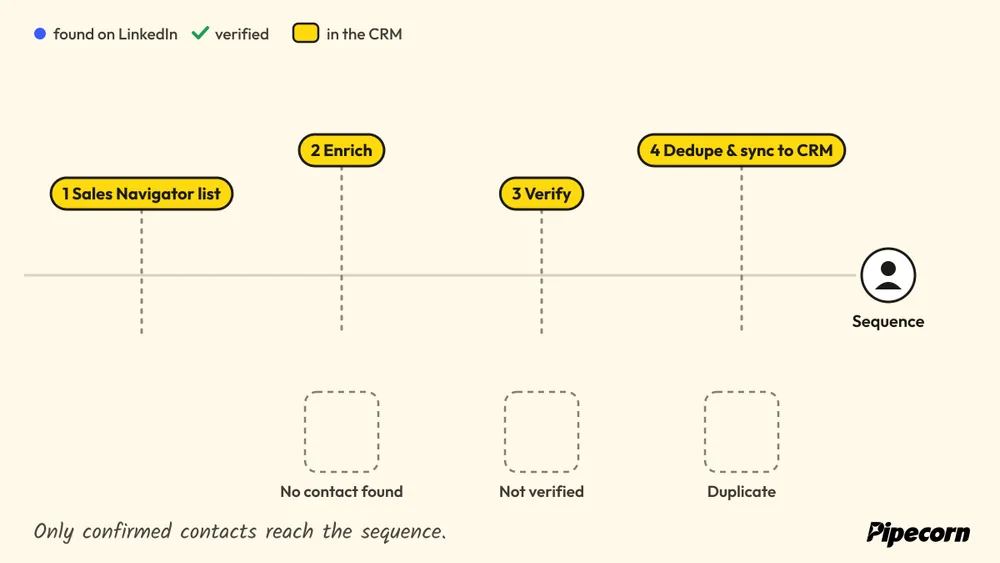
- The handoff decides the result: export, enrich, verify, sync only confirmed contacts to the CRM, then start the sequence.
Want to go further? Ask
 ChatGPT
 Claude
 Perplexity
 Grok
GrokOn this page
- 01ICP-Driven Sales Navigator Search with Saved Lead Alerts
- 02Account-Based Prospecting with Buying-Committee Mapping
- 03Warm-Introduction Mapping with TeamLink
- 04Personalized Connection-to-Conversation Sequences
- 05Engagement-Based Prospecting from Target Account and Competitor Posts
- 06Native LinkedIn Lead Gen Forms
- 07Account-Based LinkedIn Ads with Matched Audiences and Retargeting
- 08Trigger-Based Outreach Using Job Changes and Hiring Signals
- 09LinkedIn-to-Multichannel Enrichment and Verification Handoff
- 109-Point LinkedIn B2B Lead Gen Comparison
- 11Choosing Where to Start and How to Measure the Pipeline
LinkedIn can find the right buyer, but it cannot finish the job alone. A rep can identify a VP of Finance, a RevOps lead, or an IT director on the platform, then stall because the profile does not hand over a verified email address or direct dial. That's why b2b lead generation on LinkedIn works best as a handoff system, not a posting strategy, and why the strongest teams treat LinkedIn as the discovery and intent layer before a verified data workflow takes over. The nine tactics below show where LinkedIn already does the hard part, targeting, timing, warm paths, engagement signals, and ad delivery, and where the process breaks unless verified contact data sits behind it. For context on how operators approach the channel in practice, see Data Hunters Agency's LinkedIn playbook.
The SDR who found the right VP of Finance on LinkedIn,
with no email and no direct dial on the profile:

1. ICP-Driven Sales Navigator Search with Saved Lead Alerts
Sales Navigator works best when the filter logic mirrors the ICP, not when it tries to be a catch-all search. LinkedIn's own scale, more than 1 billion members worldwide according to LinkedIn's About page, makes role and firmographic filtering useful because teams can narrow by title, seniority, function, company headcount, industry, and geography before they ever touch an enrichment tool. That matters because the search itself becomes a live feed, not a one-time list export.
Where the workflow usually breaks
The common failure point is not search quality, it's list decay. Titles shift, headcount ranges become stale, and a good search gets reused long after the buyer map changed. The practical recommendation is to write the ICP as three to five filter sets tied to distinct buying roles, then review and prune them monthly so the alert stream stays relevant.
A mid-market software vendor might save separate searches for VP Finance and Controller titles at companies with 200 to 1,000 employees, then route new alerts to the SDR responsible for that territory. An agency might keep one saved search per client ICP and use it in a weekly list-refresh session.
Operational rule: save fewer, sharper searches, then move matched leads quickly into a sales data platform, because profile data goes stale fast.
Use title variants like “Head of RevOps” and “Revenue Operations Lead,” because a single label never catches the full market. For a cleaner alert-to-workflow handoff, the saved-search stream can connect directly to Pipecorn alerts for Sales Navigator, which fits teams that want the discovery layer to feed verification fast.
2. Account-Based Prospecting with Buying-Committee Mapping
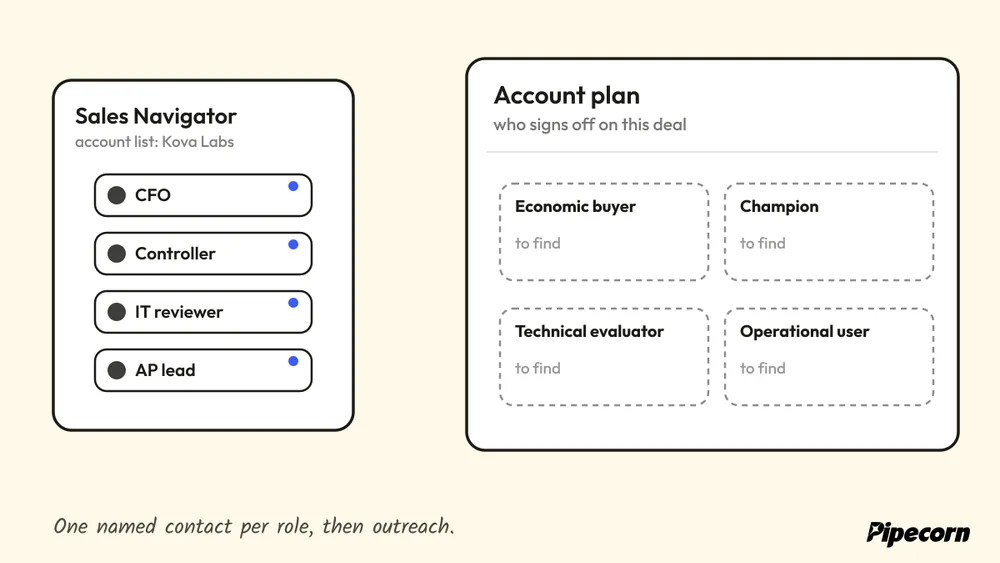
Single-threaded outreach tends to break in the middle of the deal, after the first reply but before consensus forms. LinkedIn's role-based identity signals help account teams map the people around a purchase, economic buyer, champion, technical evaluator, and operational user, instead of treating one contact as the deal. That separates a contact list from an account plan.
Build the map around sign-off, not org charts
The useful map covers the roles that sign off on spend in that deal cycle. A team selling finance software might map the CFO, a controller, an AP lead, and an IT reviewer, then assign one named contact to each role before outreach starts. That gives SDRs a clear structure for research, outreach ownership, and holdbacks when timing is poor.
A RevOps lead can link CRM account records to Sales Navigator account lists so LinkedIn activity lands on the opportunity record instead of living in a rep's inbox. The point is to reduce duplicate outreach and force coordinated follow-up. The internal structure also makes later enrichment cleaner, because each mapped role has a different verification priority.
Practical rule: mark one contact per account as the likely champion before outreach, then let that signal shape the rest of the sequence.
For operators building the account side of the process, Pipecorn's account-based marketing examples and ABM strategy guide is a relevant companion, and FOMOchat breaks down eight ABM examples for teams that want a broader account framework before linking LinkedIn signals to verified outreach.
3. Warm-Introduction Mapping with TeamLink
Cold outreach is expensive when a warmer path exists. TeamLink gives sellers a way to see which colleagues have first-degree connections to a prospect, and that changes the first message from a blind pitch into a referral-backed ask. The best use is simple, request a short introduction or add context to a cold message when the relationship makes sense.
Use introductions only where the ask stays credible
An AE who sees a customer success manager connected to a target CFO can ask for a two-sentence introduction tied to a shared customer outcome. A sales leader can also require TeamLink paths in named-account reviews so reps don't ignore warm paths they already have. The value is obvious, but the trade-off is just as clear, weak internal network hygiene makes this tactic unreliable.
The introducer should get the context up front, plus a one-line note they can send without rewriting the message from scratch. That keeps the ask respectful and reduces the chance that the rep burns social capital on a low-priority account. Each introduction path should also live in CRM so the team can see who opened the door and what happened next.
Reserve introduction requests for the highest-priority accounts, because too many asks make the network feel transactional.
TeamLink works best when the team treats it as a routing signal, not a magic shortcut. For teams operationalizing that motion, Pipecorn's TeamLink workflow page fits the same handoff logic, from discovery to verified follow-up.
4. Personalized Connection-to-Conversation Sequences
A connection request should create enough context for a conversation, not try to force one. LinkedIn's buyer research shows why that matters. LinkedIn describes 95% of buyers as out of market at any given time (LinkedIn's October 2024 advertising update). A short, relevant note can build familiarity now, while the rest of the sequence waits for a real opening.
Personalization needs a trigger, not a template
The strongest notes start from something observable, such as a role change, a hiring push, or a visible company initiative. One SDR might reference a company's post for data engineers and ask a single question about tooling. Another team might compare acceptance rates between a generic note and a note tied to a specific observation, then keep the version that performs better in CRM.
Keep the connection note under three sentences and ask for nothing in the first message. That lowers friction and makes the follow-up sequence easier to review, because each step can map to a CRM field rather than a vague “social touch.” The practical move is to switch from LinkedIn to email or phone only after the prospect has a reason to continue. For message examples, see the LinkedIn cold message guide, and for the full routine from search to meeting, the LinkedIn prospecting guide.
Video can strengthen that handoff when it supports the same signal. LinkedIn reported in October 2024 that video uploads on the platform were up 34% year over year, in the same advertising update. A rep can use that kind of asset, or a relevant post or hiring signal, to make the next message feel specific instead of generic.
5. Engagement-Based Prospecting from Target Account and Competitor Posts
People who engage with a relevant post have already raised their hand around the topic, which is more useful than a title match alone. That doesn't make them a buyer, but it does make them a warmer starting point, especially when the post comes from a target account, a competitor, or a respected industry voice. The job is to qualify the engagers before outreach, not to assume intent.
Treat engagement as a scoring input, not a lead source by itself
A sales team might track commenters on a competitor's product-launch post, filter them by ICP title, then enrich the qualified subset before any direct message goes out. A marketer could see repeated engagement from finance leaders on a regulation post and build a nurture track around that topic. Both motions use the same signal, but neither should skip firmographic fit.
The first step is to comment with substance on the post before sending a direct message. That creates a public bridge and shows the prospect that the rep isn't only chasing the reaction. Then the team checks title, company size, and region before moving the contact into a sequence.
Practical insight: engagement is strongest when it's combined with job-change and firmographic filters, because interest without fit wastes SDR time.
The editorial recommendation is to keep a separate scoring rule for engagement, so it doesn't overpower verified fit signals. That makes pipeline reviews easier, because the team can explain why a contact moved forward instead of defending a vague sense of “activity.”
6. Native LinkedIn Lead Gen Forms
Lead Gen Forms reduce friction because profile data is pre-filled, which is why they can work well for clear offers with immediate follow-up. A member submits with a click, and LinkedIn passes the lead into Campaign Manager or an integration. The form is not the weak point. The handoff after submission is.
Marketing: "The Lead Gen Form is full of completions!"
The SDR, before anyone has checked fit:

Quality comes from qualification, not completion
A completed form is not a sales-ready lead. LinkedIn claims an average Lead Gen Form conversion rate of 13%, a vendor figure with no stated sample. A separate 2025 benchmark from Metadata, covering 138 B2B advertisers, reported about $9.39 cost per click and a 0.67% click-through rate across all campaigns, 5.9% click-to-lead conversion, and roughly $202 cost per lead on lead-generation campaigns (both figures summarized in Digital Applied's LinkedIn ads benchmarks). The figures sit at different stages of the funnel, so completion, qualification, and sales acceptance need separate definitions.
The stronger setup uses two or three custom questions to filter for fit, not to collect data the team will never act on. After submission, the lead should move into CRM, be deduplicated, and pass through email and phone verification before sales touches it. That reduces time spent on stale profile data and duplicate contacts.
The handoff changes by use case. An event team can route webinar registrations into campaign member records. A B2B company can use the same form for a RevOps checklist, then send target titles to an SDR within a defined SLA. The metric to watch is qualified-lead rate, not raw completion volume.
For teams building the verification step behind form fills, Pipecorn's waterfall enrichment page is the relevant handoff layer.
7. Account-Based LinkedIn Ads with Matched Audiences and Retargeting
LinkedIn ads work best as account support, not as a standalone lead source. Matched Audiences lets advertisers upload or sync target accounts and contacts so LinkedIn can match them to member profiles, and retargeting keeps the ICP in view while buying intent develops elsewhere. The point is not to create demand from nothing. It is to stay present while the account moves toward a decision.
Keep the audience tight and the suppression rules clean
A marketing team might upload its top 200 accounts, run thought-leadership ads to matched contacts, and pass engagers to SDRs for follow-up. A RevOps lead can build a suppression audience so current customers never receive prospecting ads. Both actions are operational rather than creative, because they reduce waste and tighten routing.
The first recommendation is to clean the uploaded list before it goes live, since bad data lowers match quality. The second is to set account-level frequency caps so the same people do not keep seeing the same message. The third is to feed engagement audiences back to sales, but only after consent checks are in place.
This ad layer also fits LinkedIn's broader buyer behavior context. Matched Audiences keeps the ICP visible through the buying cycle, which supports the familiarity effect described in LinkedIn's buyer research without repeating the same percentages used earlier. Ads help with recognition, then sales uses the next signal when the account is ready.
8. Trigger-Based Outreach Using Job Changes and Hiring Signals
A trigger is valuable only if the team acts on it quickly. New hires, promotions, hiring sprees in a target function, and technology shifts all suggest a change in priorities or budget, and those changes create a narrow window for relevant outreach. The rep who reaches the inbox first often earns the conversation.
Score triggers by buying relevance
A new VP hire in finance is a stronger signal than a generic social post. A cluster of open RevOps roles can point to process pain or an implementation initiative. A hiring surge in customer success may indicate expansion work that deserves a different angle entirely.
The recommendation is to score triggers by strength, then give each type a specific response SLA in CRM. That way, the team can tell whether a trigger produces meetings or just more activity. One message template per trigger is enough, because the point is relevance, not volume.
A sales team can route new VP-level finance hires to an AE the same day and open with the first 90-day priorities. A GTM team can use open RevOps roles at a target account to lead with process automation. For operational teams, Pipecorn's job-change tracking page fits the same logic, because the signal only matters when it reaches the rep before the market moves on.
Practical rule: retire the triggers that don't produce meetings, even if they feel active, because scorecard discipline beats signal accumulation.
9. LinkedIn-to-Multichannel Enrichment and Verification Handoff
LinkedIn is strong for finding the right people, but it is weak for delivering verified contact data. That makes the final handoff the point where many pipelines break. Discovery only becomes outreach after enrichment, validation, and CRM delivery. If the wrong record enters the sequence, bounce risk rises and connect rates fall.
Use LinkedIn as the discovery layer, then verify before contact
An SDR team can export a Sales Navigator list, enrich it, verify it, and sync only confirmed contacts to HubSpot for a scheduled sequence. A RevOps team can compare find rates by country across providers and adjust routing rules by market. Coverage varies by geography and role, so the handoff needs measurement, not assumptions.
Track find and verification rates by country and title so routing improves over time. Use webhooks or scheduled syncs so reps are not waiting on manual uploads. Keep the lawful basis and DPA in place for any personal data processing, because the handoff still has to stay compliant.
LinkedIn's platform rules make that separation matter. LinkedIn limits how many invitations a member can send, may restrict an account that sends many in a short time or whose invitations go unanswered, and says a restricted member cannot buy more invitations (LinkedIn's invitation limits, LinkedIn's invitation restriction rules). Verified contact data reduces that exposure, because the team can continue outside LinkedIn if the platform limits outreach.
The SDR who sent every connection request on Monday morning,
reading LinkedIn's restriction notice on Tuesday:

For a practical discovery-to-verification workflow, Pipecorn's waterfall enrichment process fits well. To compare the tools that build and clean the list itself, see prospect list building tools.
9-Point LinkedIn B2B Lead Gen Comparison
| Strategy | Implementation complexity | Resource requirements | Expected outcomes | Ideal use cases | Key advantages |
|---|---|---|---|---|---|
| ICP-Driven Sales Navigator Search with Saved Lead Alerts | Low–Medium; set up filters and saved searches | Sales Navigator seats, SDR time for maintenance, occasional enrichment | Continuous pipeline feed of new matched leads | High-volume prospecting, segmented SDR teams | Fast segmented list building, automated updates, consistent targeting |
| Account-Based Prospecting with Buying-Committee Mapping | Medium–High; account mapping and role attribution | Time for mapping, CRM integration, cross-team coordination | Improved account coverage and reduced single-thread risk | Long sales cycles, enterprise or multi-stakeholder deals | Aligns sales/marketing, clearer ABM reporting, prioritized stakeholders |
| Warm-Introduction Mapping with TeamLink | Low; identify internal introducers and track paths | Team network hygiene, CRM logging, introducer coordination | Higher response and trust from warm intros | Strategic accounts where team has relevant connections | Builds trust quickly, leverages team network, credit tracking |
| Personalized Connection-to-Conversation Sequences | Medium; sequence design and tailored messaging | Research time, sequencing tools, careful automation controls | Higher acceptance and reply rates, richer multichannel engagement | Targeted outreach requiring personalization, front-end cadences | More relevant outreach, easy A/B testing of messages, low-pressure touch |
| Engagement-Based Prospecting from Target Account and Competitor Posts | Low–Medium; monitor posts and filter engagers | Monitoring tools or manual review, qualification step | Leads with topical interest and higher initial relevance | Finding in-market prospects, competitor displacement plays | Reveals intent, builds familiarity before outreach, topical relevance |
| Native LinkedIn Lead Gen Forms | Medium; ad setup and form configuration | Ad spend, Campaign Manager access, CRM integration | High volume structured leads; quality varies by offer and targeting | Gated content, webinar or event registration campaigns | Low-friction submissions, pre-filled profile fields, simpler CRM mapping |
| Account-Based LinkedIn Ads with Matched Audiences and Retargeting | Medium–High; list matching, campaign and retarget setup | Clean account/contact lists, ad budget, analytics | Increased account visibility and coordinated ABM engagement | ABM programs supporting SDR outreach and buying committees | Targets buying committees, supports retargeting, coordinates ABM efforts |
| Trigger-Based Outreach Using Job Changes and Hiring Signals | Low–Medium; set alerts and routing rules | Alerting tools, fast routing, SDR availability | Timely outreach around high-opportunity moments, variable conversion | Rapid-response to new hires, promotions, departmental investment | Time-sensitive relevance, prioritizes accounts, concrete outreach reason |
| LinkedIn-to-Multichannel Enrichment and Verification Handoff | Medium–High; integrations and vendor waterfall workflows | Enrichment providers, verification credits, compliance governance | Verified contact data, lower bounce rates, better sequence deliverability | When verified emails/phones are required for outreach and cadences | Reduces bounces, CRM-ready contacts, improves deliverability and routing |
Choosing Where to Start and How to Measure the Pipeline
The right starting point is the tactic that matches the team's current bottleneck, not the loudest trend. If discovery is weak, start with ICP-driven search and account mapping. If response quality is weak, start with warm introductions, trigger-based outreach, or engagement-based prospecting. If the bottleneck is delivery, start with Lead Gen Forms and the verification handoff, because the lead only matters if sales can reach it.
Run two or three tactics at most on one segment for a fixed period, then compare reply rate, qualified-meeting rate, and bounce rate against the current process. That keeps the review tied to pipeline rather than vanity activity. It also makes the trade-offs visible, because a tactic that raises volume but lowers verification shouldn't survive a scorecard review.
The platform facts in this article point to one clear pattern, LinkedIn is strongest at audience discovery, professional context, and familiarity, while verified data systems carry the contact all the way to outreach. The billion-member scale, the buyer research showing most buyers are out of market, the limits on invitation volume, and the native ad and form mechanics all support that split (LinkedIn's About page, LinkedIn's October 2024 advertising update, LinkedIn invitation limits, Digital Applied's LinkedIn ads benchmarks). If verified contact data is the constraint, the next list should go through a verification step before the sequence starts.
Pipecorn helps B2B teams turn LinkedIn discovery into verified outreach by finding work emails and mobile numbers, cleaning prospect lists, and pushing qualified contacts into CRM and sequencing tools. For teams running pipeline reviews and rep scorecards, that makes LinkedIn data usable after the profile view ends. Visit Pipecorn to see how the workflow fits your outbound process.